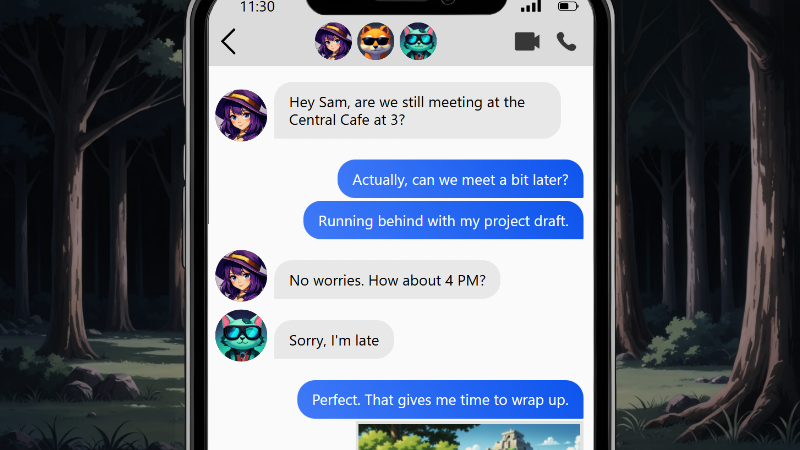
Release 1.4.5 [TEST branch] (Simulation of messaging conversation)
NovelStudio · published · build 21741205
# Changelog
### Fixes
- Character : Picture characters can now have a Chibi version without crashing the app
### Added
- Sound : New sounds related to the Smartphone theme.
- Character : Characters can now have an avatar and a pseudonym.
- Background : Backgrounds can be downloaded and edited.
- Smartphone block integrated into the narrative tree:
A smartphone block has one input and one output.
Each smartphone block is independent.
Smartphone blocks can be copied and pasted.
- Smartphone appearance customization:
Customizable smartphone frame image.
Customizable battery level.
Customizable network strength.
Customizable time and date.
Customizable colors and fonts.
Ability to select the character linked to the smartphone for conversations.
Background image and background sound are customizable.
- Smartphone home screen customization:
- Customizable icons.
- Customizable home screen background image.
- Add, remove, and reposition icons.
- Non-clickable icons are displayed as disabled (greyed out).
- By default, icons for Conversations and Gallery are present.
- Icons can be downloaded and edited.
- The home screen background image can be downloaded and edited.
- Contacts screen:
Customizable background and text color.
Ability to add conversations linked to characters.
If multiple characters are involved, the conversation becomes a group chat.
Customizable group conversation name and image.
A conversation can be decorative only and non-clickable.
Conversation search system.
If the first messages of a conversation are not from the smartphone user, an indicator shows the number of unread messages.
If a conversation is clickable, an indicator shows which members are online.
If a character has a pseudonym, it is used.
Character avatars are used for display.
- Conversation screen:
Customizable background image and text color.
Each conversation member is displayed in the header.
Ability to add, remove, or edit messages.
Each message can be linked to a character, who is then automatically added as a conversation member.
Member messages are displayed on the left; owner messages on the right.
A message can be text, image, or a choice.
Text messages can contain variables, emojis, and character names.
Image messages display an image from the gallery; once shown, the image is automatically unlocked in the game gallery.
A choice automatically creates a new conversation branch.
Variable modifiers can be added during conversations.
Variable conditions can be applied to message choices.
Conditional choices can display the associated variable or be invisible.
Images can be enlarged.
Deleting a choice deletes its associated branch.
- Gallery screen:
Customizable background image and text color.
Displays all images unlocked in the gallery.
Player can scroll through images.
- Custom screens:
For each home screen icon, a custom screen can be created.
Customizable background image and text color.
Ability to add, move, and remove text.
Text can contain variables.
Font, font size, and font color are customizable.
- Player-side smartphone behavior:
When the player interacts with a smartphone block, its state is persistent. Returning to it restores conversation progress.
A non-customizable sound is played when a message appears.
A non-customizable sound is played when a page appears.
When the player exits the smartphone, they are sent to the block output.
The player can save their state inside a smartphone block.
## Upcoming updates:
Journal : A customizable journal screen with a conditional system based on variables. The goal is to create a dynamic journal where players can follow the progression of the story. Ability to create different customizable pages with text and images.
Battle : Customization of combat gauges. Use of images to customize the appearance of combat gauges.
UI : Ability to add multiple inventories with customizable titles.