Oblivity Update 2.8 // Setup Screen, Creator Improvements, Training Routines
Oblivity · published
Developer Note
Hello Oblivity Community,
This update focuses on adding a new Setup Screen, that should help new users to quickly input all their settings. You will also find a lot of small changes, and a improved Map and Scenario Creator. Many of the new features and bug fixes in this update were inspired by your feedback on our official Discord server. We encourage you to join the conversation and help us continue to improve Oblivity! Additionally, we are now activly seeking new testers through the Discord server.
Cheers,
Poly Games
Change Logs
Scenario Setup Screen
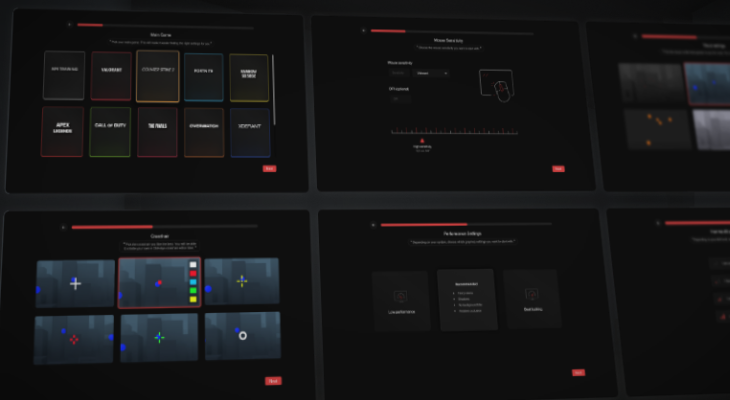
First-time users will now see a setup screen that provides a quick and guided way to configure their settings. This includes options for their main game, sensitivity, FOV, visual settings, and crosshair customization. Additionally, users can directly start a routine from this screen. This enhancement aims to make the onboarding process for Oblivity more streamlined and user-friendly.
Scenario Creator Changes
We've updated the UI of the Model Editor to support a wider variety of 3D models in the spawn pool, giving you more possibilities for designing cool maps. This update also enables us to add new models quickly, so expect more to come soon. Additionally, we introduced a special tool for creating hollow boxes of any size with ease.
In the Scenario Creator, we've added several preset templates for weapons, characters, targets, and maps. These templates simplify the process of creating scenarios and make it much more user-friendly for newcomers. We can't wait to see what you create with these new features!
Quality of Live & Bugs
- fixed some issues with sensitivity rounding
- the sensitivity progress percentage now works as intended
- removed trending row
- added options to rearrange scenarios in the playlist editor
- replay system should now work better, with Behaviour System Scenarios
- removed some unnecessary Graphics on the sensitivity finder screen
- fixed a issue where gridrows are not filling up the screen when scrolling
- fixed movement preview not working if scenario has not target
- the movement preview now updates instantly after making changes
- updated some gridrows with the new arrows
- you can now click on the scenario name in the Pause screen to open the Scenario Information screen
- spray patterns will enable tracers by default
- fixed graphical issues with the data falloff chart in the sensitivity finder
- fixed chart going out of mask for the scenario specific sensitivities
- fixed these achievements: BullsEye, #1, Top 10, Top 10%
- fixed that templates were editable