Status
SteamPeaks
ChartsSalesUpcomingPatchesNewsCalculator
New on SteamEvery app, DLC and depot the minute Steam creates itAppsEvery app on Steam, newest change firstPackagesSubs and bundles, and what each containsDepotsDepots, manifests and install sizesTagsSteam's user tags and the games under themDevelopers & publishersCompanies and their cataloguesTechnologiesEngines, SDKs and anti-cheat found in the filesChange historyEvery PICS changelist as it lands
SignalsNineteen readings of the whole catalogueCompareAny games side by sideRecordsAll-time peaks and the days they were setReportsWeekly and monthly write-upsAlerts & newsroomWatch a game, get told when it movesSteam statusIs Steam up, right nowWeb API explorerTry the endpoints in the browser
NewsSteam's own announcements and the sales calendarCalculatorWhat a Steam account is worth, and its pile of shame
/
Sign in
/
SteamPeaks
The ultimate resource for Steam data.
ExploreChartsSalesSales and festsUpcomingPatchesNewsRecordsTrendingSignals
DatabaseAppsPackagesDepotsTagsDevelopersTechnologiesChange history
ToolsCalculatorCompareSearchAlertsSteam statusAPI
SiteMethodologyFAQDiscordSupportSign in via Steam
Not affiliated with Valve or Steam. Game names and artwork belong to their owners. All times UTC.
PrivacyCookiesFair useStatus
Dominatrix Simulator: ThresholdNewsSex Toy Connection Instructions
Community

Sex Toy Connection Instructions

Dominatrix Simulator: Threshold · published 31 May 2024, 17:01 UTC

All newsPlayers around this dateRead on Steam

There are two ways to connect sex toys to the game

1. Buttplug.io

Connect any toy through buttplug.io using your PC’s built-in bluetooth adapter or an external bluetooth adapter dongle.

2. Lovense App

Connect any Lovense toys through the Lovense app on your phone to the game over your wifi network.

Buttplug.io Connection

You can connect to your toy directly through the game, which does not require any app and does not require use of Intiface Central.

1. Disconnect Apps - Make sure any phone or PC apps that normally connect to your toy are not active before you try to connect it to the game (including Intiface Central)

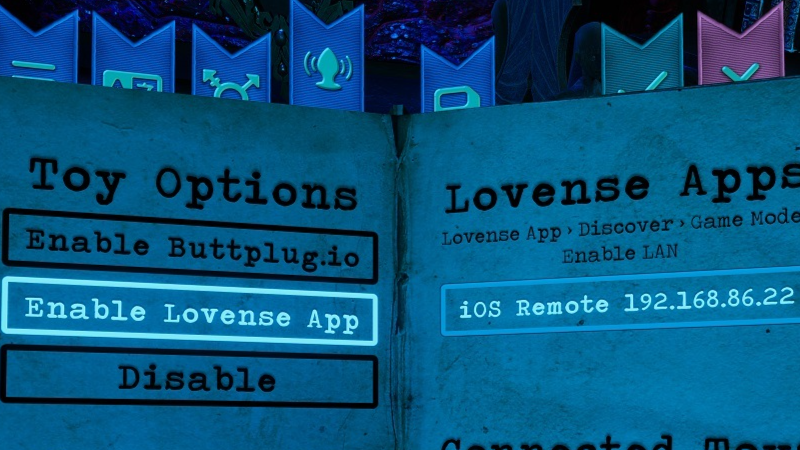
2. Enable Butplug.io - Inside the journal in the game, select the vibrating buttplug bookmark then select ‘Enable Buttplug.io'. The game will automatically start listening for toys and list any it finds on the right.

3. Put Toy in Pairing Mode - Put your bluetooth-enable toy into pairing mode. This is usually done by holding down the power button when the toy is off until it’s light starts flashing, though your specific toy may be different.

4. Wait for the Toy to Appear - The toy name should pop up on the opposite page in the journal, which is confirming that the toy is connected.

5. Test the Toy - You can select the toy’s name to send a quick buzz to make sure it’s active and connected.

6. Play the Game - You can simply start playing from there. Any toy-enabled animations and interactions should now trigger the toy as well.

Lovense App Connection

You can connect any Lovense toy to the game via a phone app. This is particularly useful when you are using Lovense toys and your PC doesn’t have a bluetooth adapter.

1. Connect Toy to Lovense App - Connect toy Lovense toy to your app as you normally would to control it with your phone.

2. Enable LAN in App - In the Lovense App on your phone, go to the ‘Discover’ section and select ‘Game Mode’, then turn on the ‘Enable LAN’.

3. Enable Lovense in Game - Inside the journal in the game, select the vibrating buttplug bookmark then select ‘Enable Lovesen App’.

4. Select Lovense App in List - Your lovense app is matching info from the ‘Enable LAN’ screen should show up in the game. If it isn’t automatically selected, select the Lovense App. You should now see a list of toys you’ve connected to the app and they should all be enabled in the game.

5. Test the Toy - Select any connected toys from the toy list below the app list. You should experience a quick buzz to make sure it’s connected and responding as you would expect.

6. Play the Game - You can simply start playing from there. Any toy-enabled animations and interaction should now trigger the toy as well.

More from Dominatrix Simulator: Threshold

Other announcements

All news
Major update15 May 2026Newest Release v2.12.0 — Enforcer Furia's Punishment Edging SceneHello, everyone! This update brings the Enforcer Furia Punishment Edging Scene — a full punishment scene with a native Spanish-speaking voice actress — along with oscillating toy support, an engine upgrade, and refreshed translations across all 11 supported languages. Here's what's new! Wallow in Enforcer Furia's Punishment Edging Scene Enter her dungeon. Choose a punishment. And find yourself…Game update13 Mar 2025Dominatrix Simulator Release v2.11.1What to Find in This Update This minor update focuses on major improvements to the emotional expression and lipsync matching of voice tracks to our Mistresses orgasms !! In addition, we did a ton of clean up to over 1000 existing voice lines to clean up their lipsync settings and reduce broken mouth movements. Have a quick read through what we did and let us know if you enjoy these enhanced org…In-game event10 Feb 2025New DomSim Update v2.11.0 - Furia's Pegging Reward!Hello, everyone! This update brings you a brand new reward scene with Enforcer Furia and major enhancements to sex toy integration, along with several quality-of-life improvements and fixes. Here’s what’s new! Furia’s Pegging Reward Scene Our hottest new scene with Enforcer Furia lets you submit to her pleasure for your reward! Enjoy some hot pegging while you lay on her wooden table in the dun…