Status
SteamPeaks
ChartsSalesUpcomingPatchesNewsCalculator
New on SteamEvery app, DLC and depot the minute Steam creates itAppsEvery app on Steam, newest change firstPackagesSubs and bundles, and what each containsDepotsDepots, manifests and install sizesTagsSteam's user tags and the games under themDevelopers & publishersCompanies and their cataloguesTechnologiesEngines, SDKs and anti-cheat found in the filesChange historyEvery PICS changelist as it lands
SignalsNineteen readings of the whole catalogueCompareAny games side by sideRecordsAll-time peaks and the days they were setReportsWeekly and monthly write-upsAlerts & newsroomWatch a game, get told when it movesSteam statusIs Steam up, right nowWeb API explorerTry the endpoints in the browser
NewsSteam's own announcements and the sales calendarCalculatorWhat a Steam account is worth, and its pile of shame
/
Sign in
/
SteamPeaks
The ultimate resource for Steam data.
ExploreChartsSalesSales and festsUpcomingPatchesNewsRecordsTrendingSignals
DatabaseAppsPackagesDepotsTagsDevelopersTechnologiesChange history
ToolsCalculatorCompareSearchAlertsSteam statusAPI
SiteMethodologyFAQDiscordSupportSign in via Steam
Not affiliated with Valve or Steam. Game names and artwork belong to their owners. All times UTC.
PrivacyCookiesFair useStatus
WhirligigNewsWhirligig 5.26 - loads of little updates and hand tracking
In-game event

Whirligig 5.26 - loads of little updates and hand tracking

Whirligig · published 1 Jun 2024, 18:05 UTC

All newsPlayers around this dateRead on Steam

Hi everyone

So I've been working on a load of updates including a bit of a overhaul of the VR controller detection system. This has included the addition of hand tracking. So a quick overview.

This is a quick post so lacking a bit of detail as I wanted to get this release out so people can try it. The control system has been worked on so let me know if you have any issues.

A quick note. Hand tracking isn't on as default. It will be disable in the settings/input menu. Switch it on and it should start working. I've only tested this with the Quest 3 but it should work on other headsets as well as it's using XRhands.

Updates:

  • Mouse right click plays/pauses.
  • Mouse doesn't get locked to screen when playing in locked panning and full screen cinema mode.
  • Direct audio option added to audio menu.
  • Hand tracking.

Hand Tracking

This is the first release of this so it's a little rough around the edges. Hand tracking is a mystic art and anything that feels like it's working is a win. This is how it works.

Control panel use
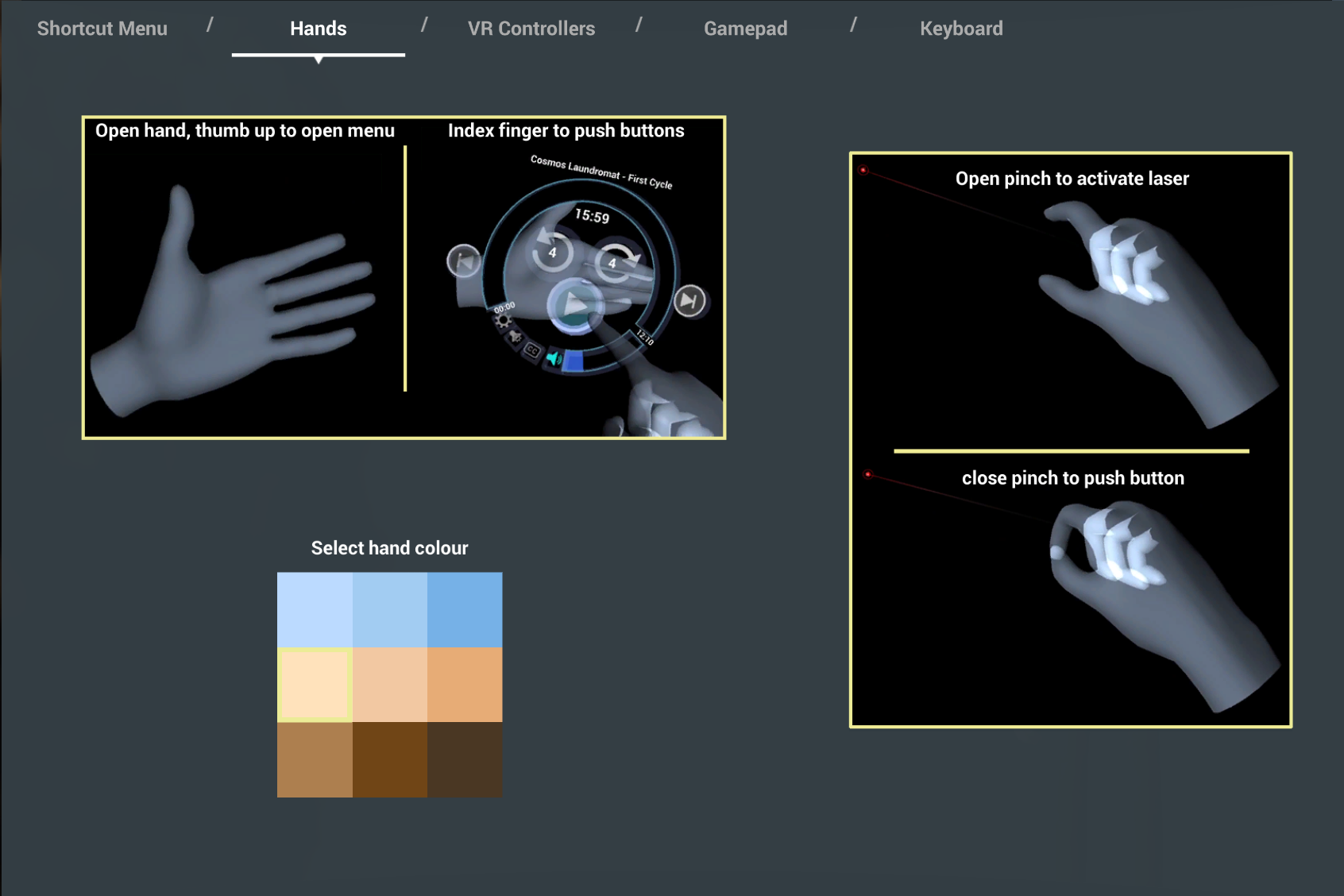
If you open your palm up with your thumb out the control panel will appear on your palm. You can then push the buttons on your palm. They should do all the things you expect that it does.

Pinch menu use
Put your hand into a pinch gesture (without the palm one above) and the laser will link to your hand. You can then pinch to select items on the menus. This should work just like the controllers with the trigger.

Is that it?


Yes. Well no. This is the first release and I want to make it much more usable. This is the first release to give people a chance to try it and hopefully let me know what's working, what's not and how I can improve it. I will continue to work on it but your feedback is very welcome. Please let me know what you think :)

And finally


This was a quick release update but took a long time to do. Hopefully it works well and I very much want to hear what you think. Again, positive reviews are always welcome as well as feedback and bug reports.

I hope you like the update.

Happy watching :)

Phil

More from Whirligig

Other announcements

All news
In-game event31 Aug 2026whirligig_v5.8000 work continues on Steam Deck and now Steam Frame compatibilityHi everyone With the upcoming release of the Steam Frame I have been working on getting Whirligig working well on the Steam Deck, and thankfully I've been provided with a Steam Frame so I've also been getting it working with that. Overview Both the Steam Deck and Steam Frame run Proton for Windows apps, which has a few considerations that need addressing. Steam Deck/Steam Frame · Disable DLNA a…Steam news9 Aug 2026Whirligig Steam Deck compatible version - early beta whirligig_v5.8000Hi Everyone As people who are in the know, know, the Steam Frame is on its way with a lot of development into SteamOS. Well in anticipation I'm working on getting Whirligig compatible with SteamOS (through proton) and the first stage was to borrow a Steam Deck and get it working there. The first version is now available for beta download whirligig_v5.8000. What's changed SteamOS and the Steam D…Major update31 Jul 2026Whirligig default update, a lot of changesHi Everyone It's been a while since the last default update, and I've spent that time working through a run of beta releases to get us here. This release has a lot of updates. I've rebuilt a lot of Whirligig's core, for stability and performance, added a free companion app for controlling headsets over your network and I've worked on bringing a lot of the long requested features into this build…