I've had a couple of comments regarding it not loading. I've made some changes including moving the permissions thing for networks so that you'll only be asked if you wish to use the network feature. I've also tried to optimise the startup code as it seems to take a long to to start when started for the first time. I'll continue to look at this over the next few days. The new version is Whirligig 5.11
Hi everyone
I've often had the request for a network location support feature on both Stand alone headsets and PC based headsets. This has been very difficult to implement as I'm not that well versed in network protocols but with the update to the VLC plugin this has opened up the options to include network browsing. It's taken me a while but here is the first release that includes this feature :)
As this has meant a rewrite of the browsing system in Whirligig I've taken the opportunity to improved and optimise the code so it should now run faster and hopefully more stable than before. Here is an example of the new Explorer:
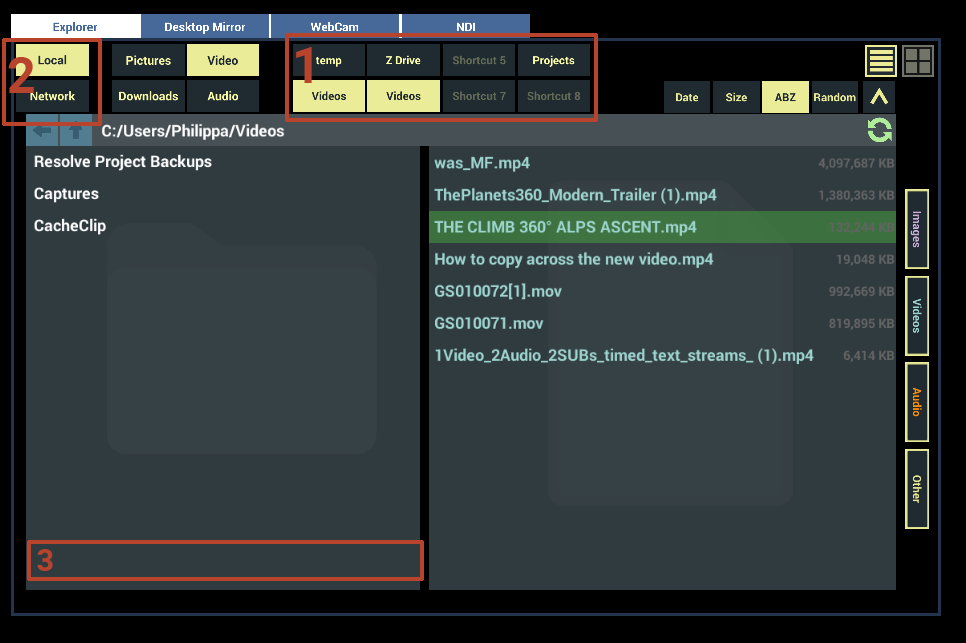
Here is a rundown of the changes:
1 : You'll see that I've added 4 new shortcut options and also had them so they will display the folder name of the shortcut that they are linked two. I've also adjusted the way they are saved in the 'ini' file as they were using a comma as a separator, which is a legal character in folder names. This causes issues if the folder had that character. I've changed this so the conflict won't arise. However this does mean your Shortcuts with be removed on first load as the old system isn't compatible.
2: Local and network browsing has been added. Local will display your local drives (c:\, d;\ etc) and Network will show any Network locations that can be found.
3: With the addition on Network browsing I wanted to find the most space officiant way to improve the browser and also make the browser identical on both standalone and PC. I've removed the direct access to the drives and widened the Folder window. I've also extended address bar to make it easier to see where you are.
Network Browsing Overview
LibVLCSharp protocols
To make the network access as future proof as possible I've used the LibVLCSharp network access system to allow the locations to be viewed. This means that Whirligig is using the same system as VLC to browser and playback network located media.
UPnP (Universal Plug and Play), DLNA (Digital Living Network Alliance) as well as SMB are supported. Basically anything that VLC will find should be found by Whirligig.
Video playback
All video path and image playback will work with network locations. So you should be able to choose your proffered playback engine such as Media Foundation.
Current Know network browsing issues
No Network Password support
This is the first version of the network implementation and as such I've not implemented any password options for shares that require username and passwords. This is, again another difficult implementation and I'll be working on it for up and coming versions. I would like to know how much this is a problem for people as well. In using the VLC network browsing I've noticed it doesn't ask for the username/password. So I'm not sure how much this is expected anyway.
Network shares not being listed or being listed more than once
As I'm using the VLC implementation I'm reliant on the response that it provides. If the plugin doesn't give me the address then I can't show it. I've also noticed that sometimes the same address will appear multiple times.
I am working in checks for these issues, such as checking if the network share has any folders, checking the id doesn't match other locations. These improves will come in over time as I become more aware of them.
Help from you
Basically up until the implementation of this feature I haven't been using a shared network location. Because of this I'm sure I'll miss features that most people want and will need to fix issues for future versions.
If you could tell me what is missing, if you are finding that it's working and any feedback that might help me to improve the feature please let me know :)
UI interaction and for explorer overhaul
Browser
I've rewritten about 80 percent of the code that ran the browser to improve overall speeds, implement the network features, improve the cross support for thumbnail view and list view and open up the ability to add new features and improvements.
I have some features requests such as a search option but are there other things you would also like to see? Also is the new browser causing any problems?
UI interaction
I've also rewritten some of the UI interaction to allow better compatibility and more reliable usage. Previously things like hover over sprite change didn't work and sometimes buttons would get stuck etc. This update should fix a lot of these issues making the overall experience feel more solid and responsive.
As this is a change that effects all interaction in the UI there might be issues that I need to resolve. If you come across anything not working the way you expect please let me know.
Other updates
Improved UI
I've worked on bringing the designs of the UI buttons, toggles and sliders together so that they use the same assets and looks. This should make the whole experience feel more universal and coherent.
Additional updates
I've worked on optimisation to improve overall performance, added link features to the surround sound options, updated plugins, SDK's and the Unity engine version.
And finally
This update makes quite a lot of changes that effect the whole of Whirligig. The browser need a complete rethink and UI interaction was broken and needed updating. Because of this please let me know of any issues. I've tested Whirligig extensively during developement of these new features but there are always things that slip through the cracks. It's likely that if something in the UI is no longer working then it will be an easy fix to update for the next version.
Apart from all that. Thank you all again for your support over the years and happy watching :)
Phil