The fourteenth preview build of the new in-development Desktop+ version is now available. Quick turnarounds*.
These builds are supposed to give a glimpse into the ongoing development process.
The NewUI branch should be fine for daily use if you can live with the missing features. Don't treat it as stable, however, as it just isn't.
While bugs are to be expected and there are a few known issues already, feel free to report anything you find in the NewUI Preview Build bug report thread.
What is Desktop+ NewUI?
Desktop+ NewUI is what eventually will become Desktop+ 3.0.
See the announcement post for the NewUI Preview Build 1 for more details.
What's new in Desktop+ NewUI Preview 14?
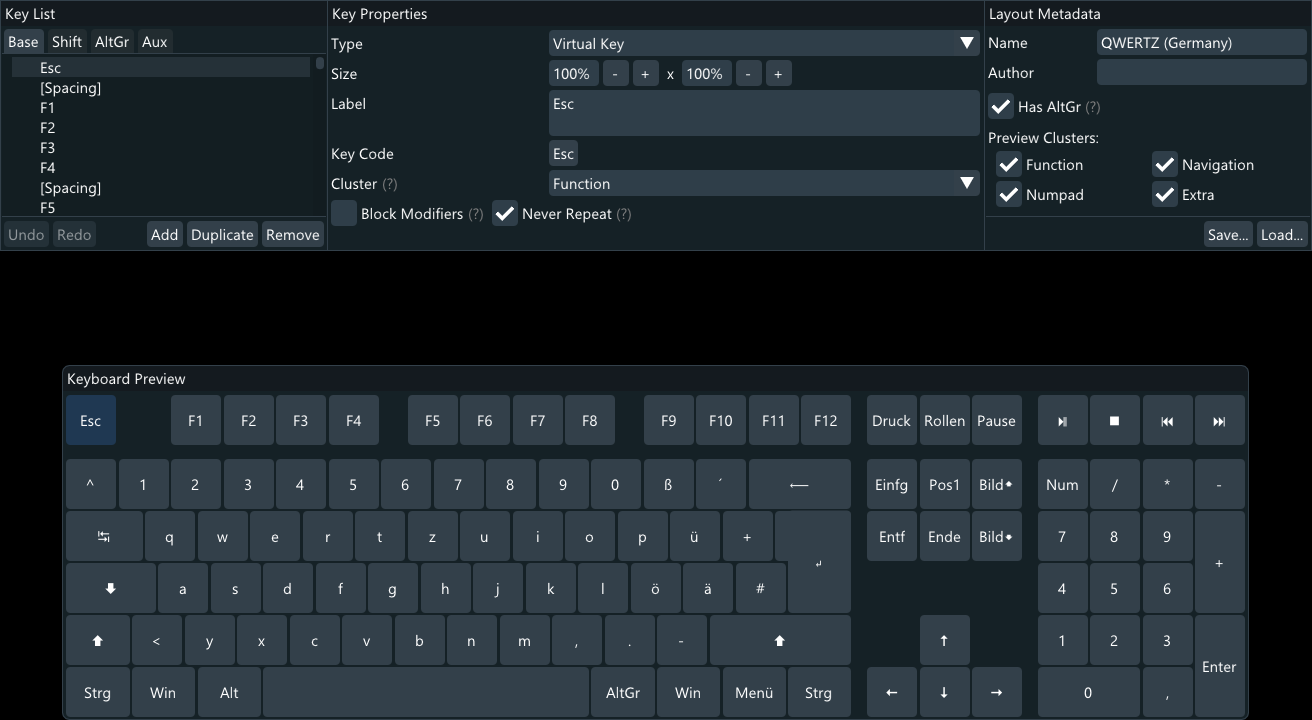
Keyboard Layout Editor
A customization option I promised from the start. But being comparatively high effort vs. expected use, it had to wait until now.
The Keyboard Layout Editor is only accessible when running in desktop mode. It can then be found in the Keyboard Layout settings.
While editing keyboard layouts is probably only something few will want to do, I think it's still worth taking a look at even if just to add some extra buttons for macros (keys can execute Actions or type arbitrary strings).
Alongside the editor, there are also a few new keyboard layouts available:
AZERTY (France), AZERTY (Belgium), QWERTY (United Kingdom), QWERTY (Spain), QWERTY (Latin America).
Community additions are welcome. Keyboard layouts can be a bit weird in terms of official standards vs. what's actually in use. I feel like actual users of those layouts might have useful input here.
For non-latin keyboard layouts I'm especially unsure if the current feature set is sufficient and if just setting up what I see online is correct. I'd love to have a Japanese layout available for example, but I feel there's no way I'd get that right on my own.
Internal Texture Handling Rework
This should only be a footnote for anyone who was unaffected by it (seemed like a rare issue), but internals regarding texture sharing have been reworked to reduce allocations to the absolute minimum.
For the few that were affected, this fixes exploding VRAM usage from overlay updates (shared texture de-allocations were not happening).
I still don't know why this was happening, but from feedback it does seems to be resolved with this.
The reason why this isn't actually just a footnote is that these internal changes rely on assumptions on how long the backing textures are valid in SteamVR.
It should be fine, but if overlays suddenly stop updating, please report so it can be sorted out.
Thanks!
Japanese Translation
This build contains a community translation by malken21 for the Japanese language.
While I generally wouldn't recommend submitting translations yet, with the current state of impending changes, I had no reason to refuse this when offered over at GitHub.
If anything, it's very much appreciated.
The translation is incomplete since I made additions after the initial submission and haven't heard back for updates yet, but it covers most of the application. Community translations lagging behind is to be expected either way, so this isn't a big deal in my opinion.
I obviously cannot vouch for the quality or if there are any typos in this, since I don't speak Japanese. I'm hoping the community can point out mistakes if they find any.
Other Changes
- Added "Toggle Dashboard (Debug Command)" default actionThis SteamVR debug command is well-known at this point, so it only makes sense to include it instead of telling everyone to do it by hand.
Nevertheless it still is a debug command offering functionality that is intentionally not provided to applications via the proper API, so don't expect this to keep working forever. - Added button to copy Action UID to clipboard to Manage Actions list
- Added command-line argument allowing external applications to execute an action ("--DoAction ")Use the new "Copy UID to Clipboard" button to obtain the UID for this.
- Added size limit to UI window overlays when resizing them during drags
- Fixed Theater Screen not working with non-Desktop Duplication overlays
- Fixed keycode picker not saving changes when picking key code for Action commands
- Fixed Action Type String commands sending keyboard input to desktop multiple times if there are multiple non-browser target overlays
- Fixed window overlay title bar drag not working when the laser pointer is moved off the overlay but still has input focus
- Fixed duplicating overlay changing the target overlay for overlay property modifications while still displaying the previous values
- Fixed single character string keys not working when they can't be pressed on the current real keyboard layout
- Fixed crash on missing hotkey & global shortcut config values
- Fixed crash on single character command-line strings
- Fixed hidden state and maximum fps not being updated when removing a cloned browser overlay
- Changed translation language naming scheme to " ()" for non-English languages
- Clicking on Floating UI Action Bar now focuses the overlayThis fixes Actions targetting the currently focused overlay not executing for the overlay the Action buttons are displayed for if it wasn't clicked into before. Also fixes the keyboard not showing up for the right overlay (or at all) in these cases.
- Command-line arguments are now also accepted in GNU-style double-dashed format
- Various other minor UI fixes and adjustments
The NewUI Preview branch also includes all changes of the stable branch up until now (v.2.8.6).
Browser overlays are available in the separate NewUI Preview + Browser branch, as explained in the initial browser overlay announcement.
* Turnarounds may not actually be quick.
March, huh? The last few months weren't fast in terms of progress, but I'm still here and there's actually not a whole lot left to do for this to hit 3.0 for real.
Next build may be the release candidate, which will then sit around while I'll get documentation and stuff sorted out. Probably.
That'd also be when I recommend interested translators to step in, though as said I probably won't stop anyone submitting earlier. Still, would save some back and forth when I make changes.