This update gives you greater control over the range of solver pass counts you want when generating a puzzle.
For any given line-solvable puzzle, the solver takes a number of passes before completing the puzzle. This number is useful as a rough approximation of difficulty.
Before this update, when generating a random puzzle, you would pick a percentile range that you wanted the random puzzle to fall within. Now you can specify the exact pass count range you want.
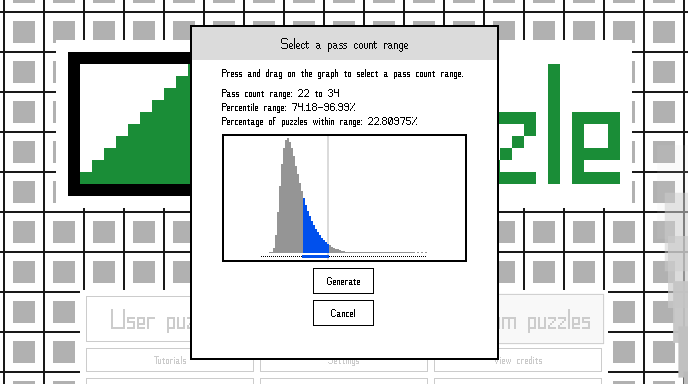
As shown in the screenshot above, you're presented with a graph representing the distribution of solvable puzzles by pass count for the selected puzzle size. You can select any range on the graph, and the readout will display the percentile range and what percentage of puzzles fall within the range you've selected. Keep in mind, the smaller the percentage of puzzles within the range, the longer it'll likely take to generate a puzzle within that range. If you select only the tail end where the outliers are, where only .0001% percent of puzzles fall, for larger puzzle sizes generating the puzzle could take days or even months!
You also have the option of skipping selecting a pass count range and just going with the first solvable puzzle that's generated, regardless of its pass count. This is also the only option for 30x30 puzzles since generating a solvable 30x30 takes so long.
To get the distribution of pass counts, I generated 10,000,000 solvable puzzles of each size, except for 25x25, which I only generated 1,000,000 for, and 30x30, which I didn't bother with because it would have taken months of 100% CPU usage to get a decent sample size. Prior to this update, the percentile ranges were based on smaller sample sizes, so they should be more accurate now.
Also, when a random puzzle is generated, it now tells you its exact pass count and percentile range, and you have the option of seeing the same information for every puzzle in the puzzle select screens if you want.
A full list of changes follows.
- Increased the pass count sample size for more accurate data. Prior to the update, percentile ranges were based on sample sizes of 1,000,000 (100,000 for 25x25). They have now been increased to ten times that size.
- Changed how the pass count data mentioned above is accessed by the game. Previously, I only stored the pass counts at specific percentile intervals, meaning that percentile ranges were limited in their accuracy and only pre-determined percentile ranges could be used when generating a puzzle. But now all of the statistical data is included, so percentile ranges that are shown are much more accurate and narrow, and any arbitrary range can be selected when generating a puzzle.
- Added a screen for selecting a specific pass count range prior to generating a random puzzle. The screen shows a graph with the distribution of pass counts for the given puzzle size, and by clicking/pressing and dragging on the graph, you can select the range you want. It will also tell you what percentage of random puzzles fall within the range you selected and the percentile values of the range. Additionally, the pass count range for each size is saved so that, when you exit the game and start it again, the same range will be selected as you left it.
- Changed the thread count to be saved so that it doesn't reset each time you start the game.
- When generating a random puzzle, the distribution data is now shown behind the live bar graph, so if you select a range where a very small percentage of puzzles is found in it, you can watch as the live graph gradually conforms to the curve of the pre-calculated data.
- The pass count (and percentile range for puzzles smaller than 30x30) of the randomly generated puzzle you'll play is shown once it's generated.
- By enabling the option at Settings > Appearance > Other appearance settings > Show pass count data in puzzle select, you can see a text readout telling you the pass count and percentile range, if applicable, of the currently selected puzzle in any of the puzzle select screens. If you have a lot of saved random puzzles, the initial startup after this update might take a while, because I neglected to save the pass count of saved puzzles prior to this update, so they have to be recalculated the first time you start the game after this update.
- The warning about discarding the currently paused random puzzle has been moved and reworded.
- Added a button to generate a random puzzle without specifying a pass count range, if you're not particular. This is the only option for 30x30 puzzles.
- Changed the title of the random generation window so that it lists the pass count range instead of the percentile range.
- Moved the label showing the count of the tallest bar to the right edge of the bar graph so that it doesn't overlap the bars.
- Fixed system memory that is no longer in use after generating a puzzle not being freed up.
- Fixed a crash that could occur if you have a 64-or-more-thread processor (look at you!) and selected more than 31 threads when generating a random puzzle. Everyone is now limited to 31 threads maximum, and less if your CPU has less threads.
- Fixed the "check if correct" option giving erroneous reports after using undo.
- Fixed random puzzle generation window's title not having the correct font size.
- Fixed a few issues with transition animations.
- Reworded some info pop-up text and probably some other things.