Greetings, Heroes! I just wanted to share information on how you can connect almost any controller to play Hero's Story.
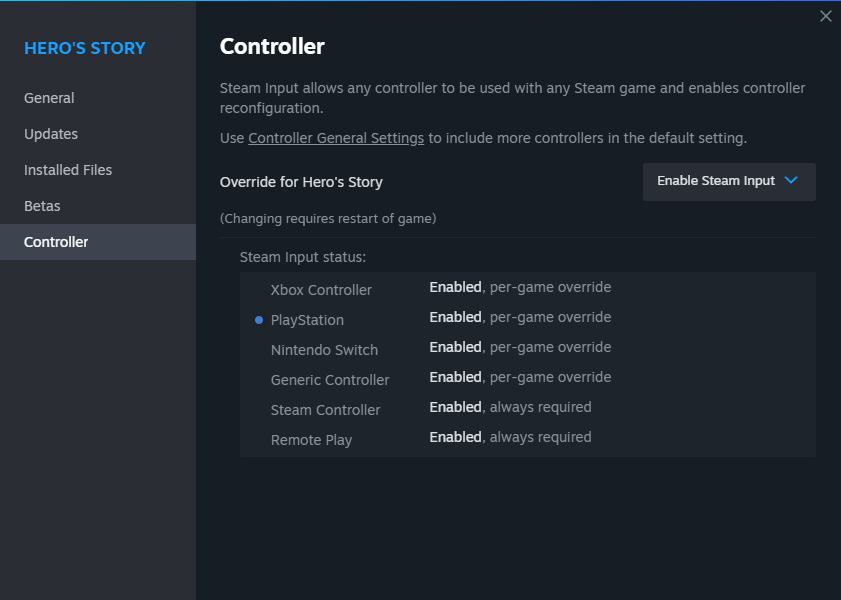
- Right-click on the name of the game in the list of Steam games and select “Properties”
- In “Properties” menu, select the “Controller” tab
- Make sure your controller is connected to PC and Steam (blue circle to the left of the controller type)
- Click on the Steam input system settings selection field
- Select “Enable Steam input” In the drop-down list
- Controller Steam input system status should change to “Enabled, per-game override”
- Close the “Properties” menu and start the game. Have fun!
This instruction includes PS Dualshock/DualSense and Xbox Controllers.
Important Note: controller support is still under development and will be enhanced in the future updates!
More from Hero's Story
Other announcements
Linux SupportGreetings, Heroes! Today I'd like to discuss running Hero's Story on Linux. Although Hero's Story doesn't have a dedicated Linux version, you can successfully run the game using the Steam compatibility tool (Proton Experimental). Hero's Story ran smoothly at 60 frames per second on Ubuntu-based operating system. Make sure that the Steam Play option is enabled for all games in the Compatibility…Second AnniversaryHello everyone! Today marks exactly two years since the full release of Hero's Story . To celebrate this milestone, I’ve prepared a new update for the game, along with a translated user manual and participation in the Steam Summer Sale. This version fixes several lingering bugs, corrects typos, makes balance adjustments, and features improved Linux support. While Hero's Story doesn't have a nat…28th of June HotfixHello everyone! Yesterday, a small update was released for Hero's Story, which fixed some of the bugs from the last update. I hope that you will enjoy this update. Additions · Added sound for portals in the Dragon Temple and the Endless Desert Bugfixes · Fixed a bug when Rotten Flesh restored a little Stamina instead of Health · Fixed a bug when the Ghoul's Eye restored a little Stamina instead…