Hi all,
At long last, I've added controller mapping support to the game!! Apologies it's taken so long. Mapping is a relatively straightforward system to implement but requires a chunk of focused and careful dev time.
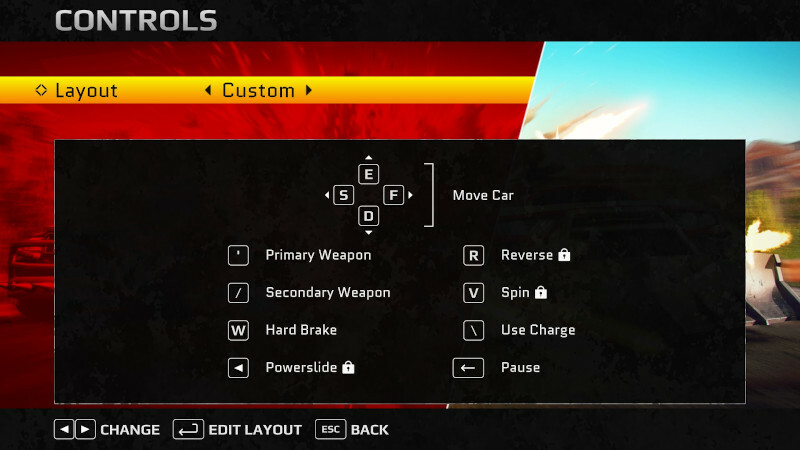
There is one custom configuration slot for gamepad and one for keyboard/mouse. Select the "Custom" slot in the controller settings and press (A) or Return to enter the config screen. If you're using keyboard you'll enter the keyboard/mouse config screen; if you're using gamepad you'll enter the gamepad config screen.
Gamepad
Any gamepad button can be assigned to any gameplay function except for car movement where there is a choice of left or right stick. Mapping only works for standard gamepads. This should cover the majority of players, but really old pads, flight-sticks or something atypical may require a controller profile in Steam in order to work (though that was probably the case anyway, even without the mapping functionality.)
Keyboard/Mouse
Any keyboard key or mouse button can be assigned to any gameplay function. Car movement can only be set up as 4 keys OR as mouse movement (i.e. you can't use mouse buttons for movement). Up to seven mouse buttons are supported. There are a few keys that can't be mapped (e.g. NUM LOCK, Windows keys).
NOTE: When remapping keyboard keys, menu navigation is not remapped (and still uses directional keys or WASD.) I may consider addressing this in future.
Please report any bugs/queries with mapping in the community discussion area.
Other fixes in this version
- Probability of Elite appearing has been increased when only one remains. This will lower the required replay count when trying to get the achievement "The Professional".
- Fix for Missile Launcher displaying negative ammo count.
Next update
- I've not included the new Boss Rush mode in this version, but it will be included in the next major one. Most of the work is done, it just needs more testing and I figured it would be best to get the controller mapping out into the wild as soon as it was ready.
The usual note:
Where feasible I will always make the previous version of the build available if you don't want to upgrade. You can access this through Manage -> Properties -> Betas and enter "PREVIOUSBUILD" as the access code. (The previous build is now set to version 1.0.2.4.)
Thanks,
Richard (Red Phantom Games).