Client Update 5/3/2023 - Avatar & Import Fixes + Vehicle Preview & Stickers
Anarchy Arcade · published
Greetings! Today’s update is a variety pack of small improvements, plenty of fixes, and a new console command to test out upcoming Source engine vehicle system support.
Multiplayer TV Head Avatars
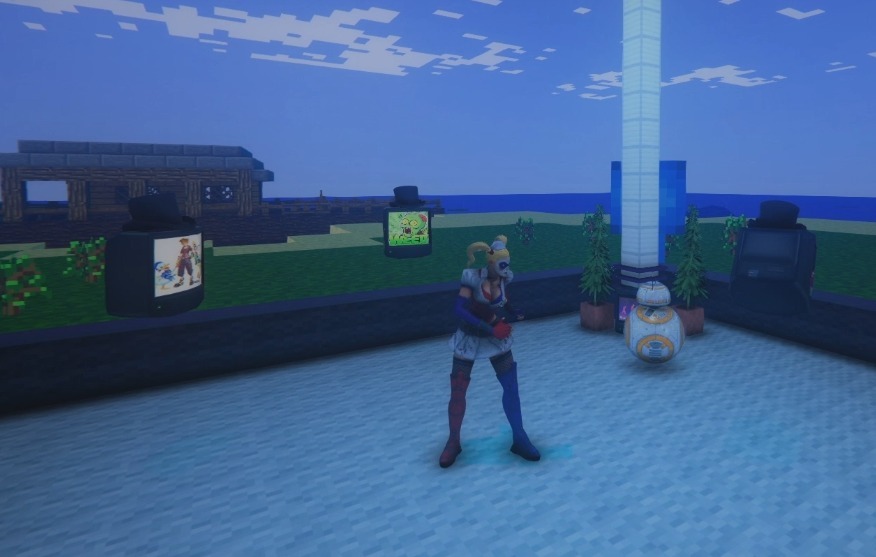
The avatar images of other people are now fixed on the menus & in-game, so now you’ll once again be able to know who you’re lookin' at just by lookin' at 'em.
Singleplayer in our own worlds are where most of us spend our time, but you can always try clicking the small Multiplayer > Servers button on the main menu to find other worlds, or host your own world that you’re in.
ːfallingmanː When exploring as a multiplayer guest, remember to have patience as things load in. For the best experience, it’s good to not click the OK button until after it looks like all the objects have finished spawning in. And check your Transfers Tab (by holding down TAB button) to watch as custom assets load in - to understand where any lag might be coming from as you walk around. Sometimes re-joining the server after all the custom assets have transferred helps things sync up more accurately. ːilyː
Importing All/Recent Steam Games
The menus for importing your Steam games are fixed and once again let you import your Steam collection in 1 large batch - or you could import just recent games instead.
You can access this feature by middle-clicking on an empty spot & choosing the Steam icon that’s underneath the search box.
Alternatively, you can still add your Steam games one-at-a-time instead by typing the game’s name into the search box BEFORE you click on the Steam icon & choose Steam Store.
And remember that you can spawn ANY game (ie. non-Steam games) by dragging & dropping their desktop shortcut into AArcade’s window while in walking around mode.
Sticker Slots Increased From 4 to 6
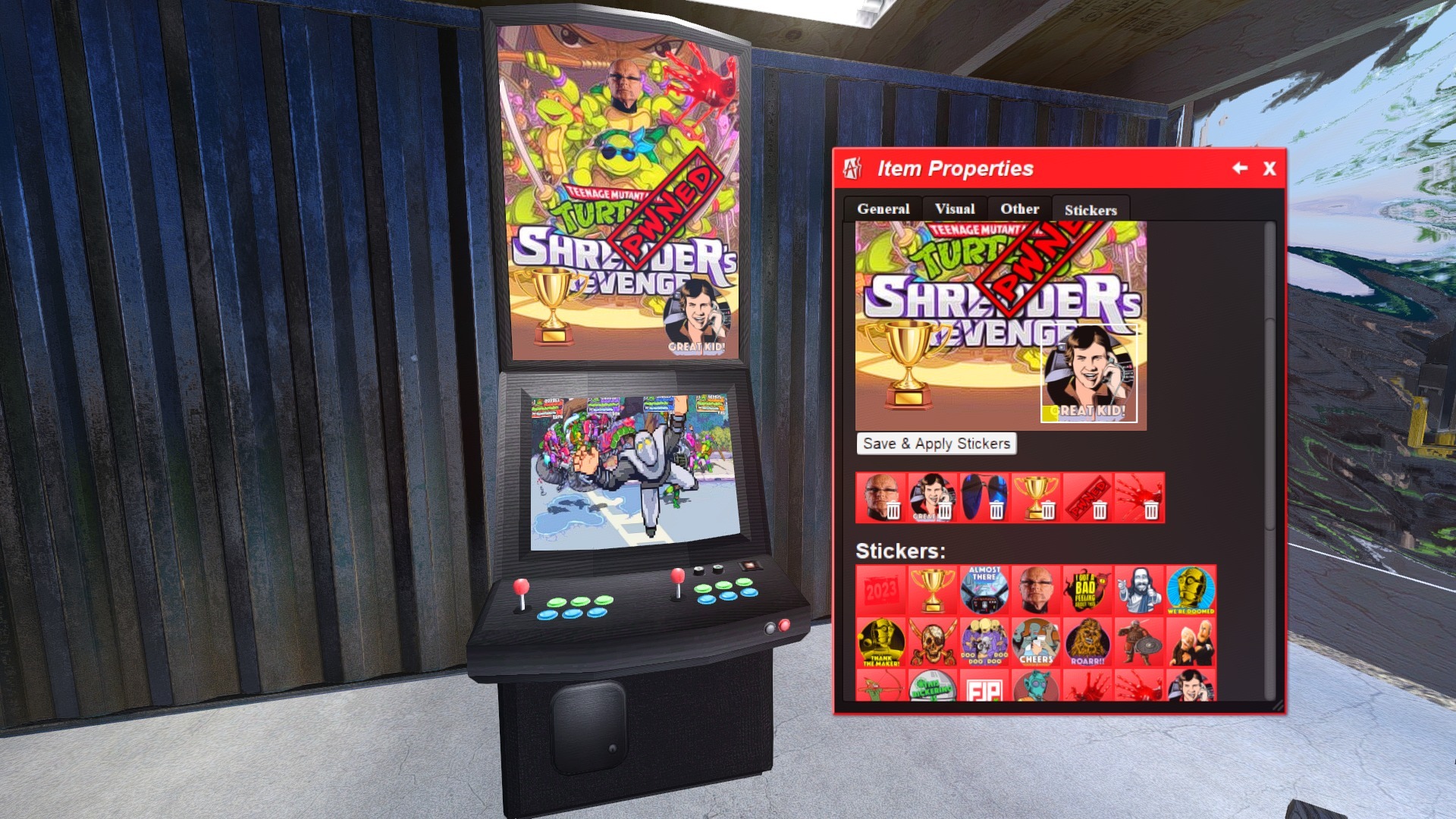
Stickers let you apply a game’s Steam Achievement icon images - or your own custom PNGs - as decorations on the cabinet’s marquee surfaces.
You do this by going to an item’s Edit Item menu > Stickers tab. There it’ll show the default stickers available, and also instructions on how to add your own custom PNGs as stickers. (You should try to use low-resolution PNGs so they load quickly for you.)
In today’s update, you’ll be able to add up to 6 stickers per item (increased from 4.)
WEBM Video Support to Always Animated Images
Watch on YouTube
AArcade has the ability to always animate certain types of media in an optimized way using a dynamic video texture atlas.
Animated GIFs, animated APNGs, short low-resolution MP4 videos, and as of today's update - WEBM videos are all supported by the Always Animated Images feature. Sometimes it’s useful to even set non-animated PNGs or GIFs as an always animated image so that it can make use of its alpha channel.
You have to manually flag which items you want to always animate. On the F7 Commands Tab there is a command called Always Animate Image near the top of the list.
It’s worth setting it to a hotkey on your action bar if you’ll be using it often.
Using the command will toggle the item you are looking at (or the nearest item to where you are looking at) to being always animated. If it shows up as a broken image icon when you do this, it means that the item you tried to flag as always animated did not have a supported media bound to it, so you should toggle it off then.
To bind a command to a hotkey on your action bar on the F7 Commands Tab, first hover over the button number you want to set a command to, then click the small box above it to switch to SET mode. Finally, click on the command in the list you want to bind to the hotkey.
Source Engine Vehicle System Support Preview
Today’s update is the 1st in a series that will improve AArcade’s support of the Source engine vehicle system. Physics-based car vehicles (such as the HL2 jeep) are now testable in AArcade w/ a console command.
You can use this console (~) command to spawn the HL2 jeep: createcar
The HL2 jeep will spawn by default. But the console command can be further customized to specify different model & vehicle scripts to use on the car you spawn. This is an advanced feature, so be sure to jump into the AArcade Discord if you need some help figuring it out, but here is the more advanced syntax of the createcar command:
createcar "models/buggy.mdl" "scripts/vehicles/jeep_test.txt"
By combining the createcar command w/ pre-existing UGC vehicles from compatible Source engine games, you can put a new spin on the worlds you build. ːdealwithitː
That’s all for today! We are resuming our monthly community meetups as well, so head into our Discord (https://discord.gg/xtPSqy8) if you are interested or need any help with AArcade. Or post your question here in the official Steam forums if you are okay with a slightly slower response. Later on! ːilyː
Change Log
- Added 2 additional sticker slots per cabinet, increasing the max from 4 to 6.
- Added a "Marquee" body group to the Fatty cabinet that lets you cycle between WIDE or TALL aspect ratios.
- Added WEBM video support to Always Animated Images.
- Added initial support for camera cut hotkeys.
- Added console command createcar. Syntax is: createcar VEHICLE_MODEL VEHICLE_SCRIPT
- Added a “replace object” icon when hovering over an in-world object while dragging & dropping something into AArcade.
- Improved preview logic to not treat Always Animated Image MP4s from Gyazo as if they were full-length videos when used in an item's stream field.
- Fixed in-game avatar images loading to TV heads.
- Fixed a bug w/ importing all & importing recently played Steam games.
- Fixed support for Source engine land vehicles - such as the HL2 jeep or similar vehicles from other Source engine games.
- Fixed various bugs w/ drag & drop item updating.
- Fixed a bug w/ TheMovieDB wizard setting incorrect type of “other” on media it matched. It now correctly sets type to “movies”.
- Fixed a bug that caused the web browser address bar to appear blank sometimes. (Also impacted some wizards causing them to put blank "reference" URLs into the item's meta data.)
NOTE
At 1:42pm Pacific there was a hotfix to this update that removed some debug buttons from the Main Menu that weren't supposed to be there. (They can be unhidden still for people who wish to test/debug stuff. More info in the Discord for those interested.)