Status
SteamPeaks
ChartsSalesUpcomingPatchesNewsCalculator
New on SteamEvery app, DLC and depot the minute Steam creates itAppsEvery app on Steam, newest change firstPackagesSubs and bundles, and what each containsDepotsDepots, manifests and install sizesTagsSteam's user tags and the games under themDevelopers & publishersCompanies and their cataloguesTechnologiesEngines, SDKs and anti-cheat found in the filesChange historyEvery PICS changelist as it lands
SignalsNineteen readings of the whole catalogueCompareAny games side by sideRecordsAll-time peaks and the days they were setReportsWeekly and monthly write-upsAlerts & newsroomWatch a game, get told when it movesSteam statusIs Steam up, right nowWeb API explorerTry the endpoints in the browser
NewsSteam's own announcements and the sales calendarCalculatorWhat a Steam account is worth, and its pile of shame
/
Sign in
/
SteamPeaks
The ultimate resource for Steam data.
ExploreChartsSalesSales and festsUpcomingPatchesNewsRecordsTrendingSignals
DatabaseAppsPackagesDepotsTagsDevelopersTechnologiesChange history
ToolsCalculatorCompareSearchAlertsSteam statusAPI
SiteMethodologyFAQDiscordSupportSign in via Steam
Not affiliated with Valve or Steam. Game names and artwork belong to their owners. All times UTC.
PrivacyCookiesFair useStatus
AniCursorNewsNew patch!
In-game event

New patch!

AniCursor · published 24 Oct 2023, 15:47 UTC

All newsPlayers around this dateRead on Steam

Hello everyone! AniCursor here!

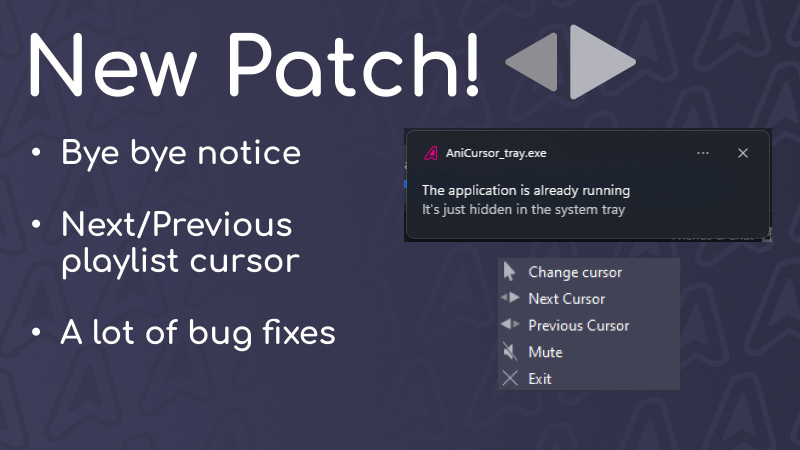
In our latest update, we've made several significant changes and improvements. Firstly, we bid farewell to the notification that the application is already running and added the ability to launch the application interface without any hassle.

We've also addressed numerous bugs, including:

1. An issue where the playlist would get disabled upon launching the application.
2. A bug that caused the cursor size to reduce to zero upon the initial use of the "Cursor Search" feature.
3. A bug related to the language not changing in the application's tray menu when switching the application's language.
4. We've also fixed several other minor bugs.

Additionally, we've introduced a feature that allows you to switch the current cursor in your playlist. To use this feature, activate your playlist, then open the tray menu and select the next/previous cursor.

We'd like to extend our gratitude to everyone who supports the project, helps identify and resolve issues, and contributes new ideas. Your involvement has played a pivotal role in enhancing AniCursor for all our users.

As always, we kindly ask everyone who can to leave positive reviews on Steam and share AniCursor with friends. This support significantly contributes to the project's development.

More from AniCursor

Other announcements

All news
Game update14 Jan 2025HotfixFixed bug with hotspots on scaled cursors. For some users, the created cursors had the wrong Hotspot. Sorry to those who have it, for the most part I have reloaded cursors with this bug myself, but if you still have it and I haven't fixed it, please go into modifier mode (click on your set on the main page and the wrench and hammer icon will appear at the bottom) and upload your set again (it w…Major update30 Dec 2024New Year Patch!Happy New Year 2025 from AniCursor! 🎉 We’re excited to share our New Year’s update with you! It brings not only improvements but also new features to make AniCursor even more convenient and enjoyable to use. New Features: Download Progress Indicator: When installing a cursor from the workshop, you’ll now see a progress bar that makes the process clearer and more transparent. Updated Menu Desig…Community30 Jul 2024Graphic tablet problemHi, so far found a temporary solution to the problem of disabling cursors on graphics tablets, you need to disable the Windows Ink feature in your tablet's driver settings After disabling it, AniCursor will work as it should.