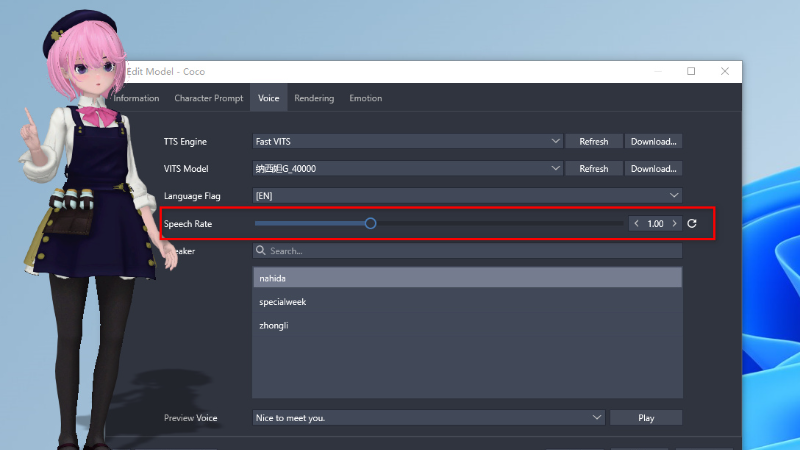
- Add a speech rate setting option in the character editing.
- Add a voice command to read the clipboard. Simply copy the text you want to be read, then say 'Read Clipboard', and the character will start reading the text copied to the clipboard. To add the voice command for reading, follow these steps: Open the voice command interface, click the 'Add' button, choose the command type as 'Read Clipboard' from the dropdown menu, and save.
- Fixed the aliasing issue with the default model and optimized the model rendering effect
More from Digital Mate
Other announcements
Improve ChatGPT compatibility API to support more free API servicesImprove ChatGPT compatibility API to support more free API servicesUpdated to Ver 4.0, Support Ollama Local AI LLM and ChatGPT4oAdd support for local AI LLM: Support for Ollama API to implement support for local AI LLM, support download LLM from Ollama library. Tutorial: · Repair and improve support for ChatGPT compatible API: support custom ChatGPT API URL and compatible with various compatible APIs, add API test connection button, add model list refresh button and temperature adjustment setting item, support ChatGPT4oImprove and optimize support for some chat serviceImprove and optimize support for some chat service