Status
SteamPeaks
ChartsSalesUpcomingPatchesNewsCalculator
New on SteamEvery app, DLC and depot the minute Steam creates itAppsEvery app on Steam, newest change firstPackagesSubs and bundles, and what each containsDepotsDepots, manifests and install sizesTagsSteam's user tags and the games under themDevelopers & publishersCompanies and their cataloguesTechnologiesEngines, SDKs and anti-cheat found in the filesChange historyEvery PICS changelist as it lands
SignalsNineteen readings of the whole catalogueCompareAny games side by sideRecordsAll-time peaks and the days they were setReportsWeekly and monthly write-upsAlerts & newsroomWatch a game, get told when it movesSteam statusIs Steam up, right nowWeb API explorerTry the endpoints in the browser
NewsSteam's own announcements and the sales calendarCalculatorWhat a Steam account is worth, and its pile of shame
/
Sign in
/
SteamPeaks
The ultimate resource for Steam data.
ExploreChartsSalesSales and festsUpcomingPatchesNewsRecordsTrendingSignals
DatabaseAppsPackagesDepotsTagsDevelopersTechnologiesChange history
ToolsCalculatorCompareSearchAlertsSteam statusAPI
SiteMethodologyFAQDiscordSupportSign in via Steam
Not affiliated with Valve or Steam. Game names and artwork belong to their owners. All times UTC.
PrivacyCookiesFair useStatus
Shards of AzuriaNewsBuild 12
In-game event

Build 12

Shards of Azuria · published 24 Jan 2023, 17:42 UTC

All newsPlayers around this dateRead on Steam

Hi all!

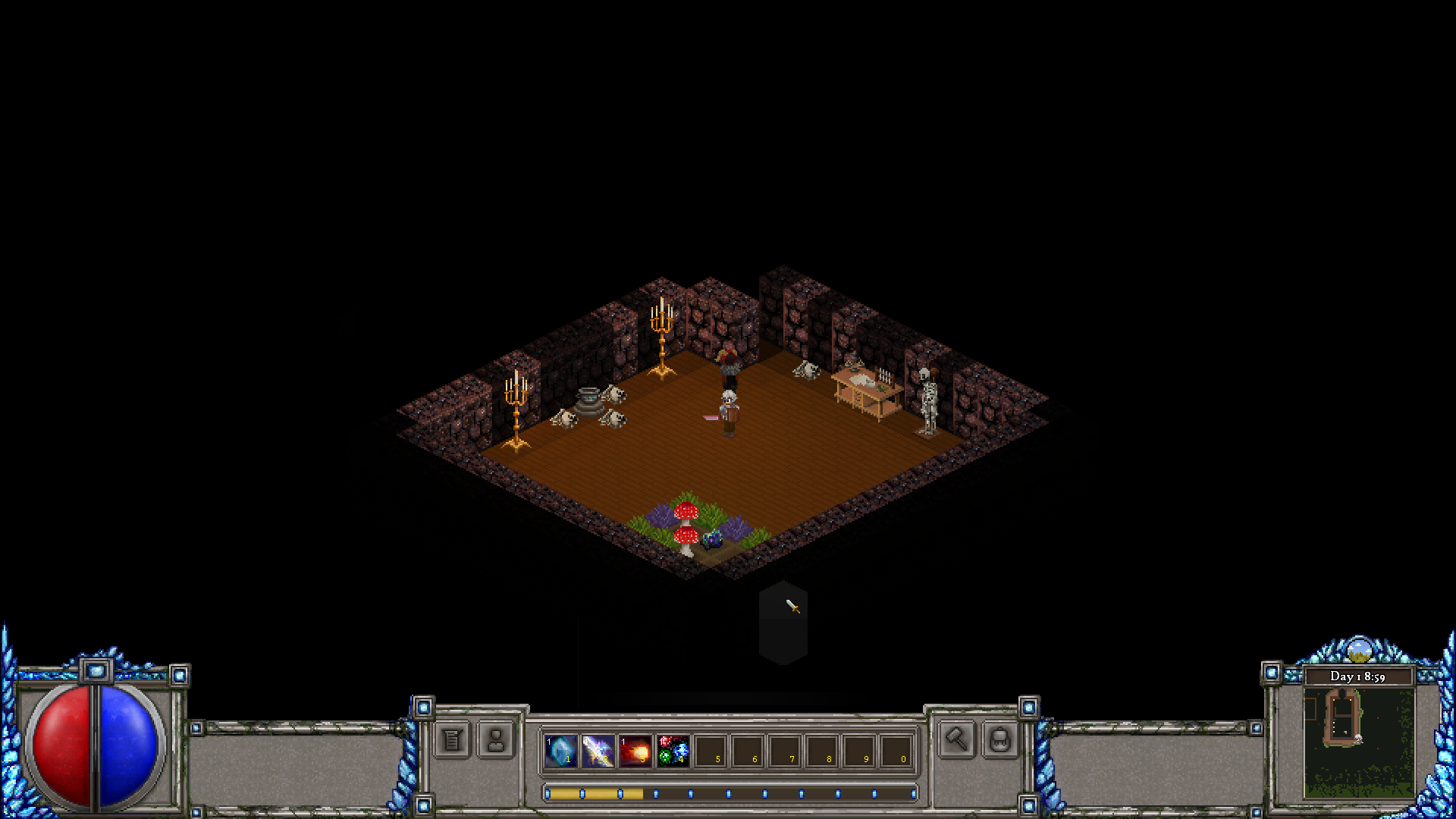
To follow on from Build 11, this build has continued reworking the UI by overhauling the look of the in-game HUD. This has involved completely redesigning the positioning and look of the in-game HUD from the elements in the top/left and top right to all be together in a single decorated bar at the bottom.
The aim was to bring things together in a more cohesive single arrangement.

Below shows the HUD section across the bottom:

Looking at the Bottom Left:
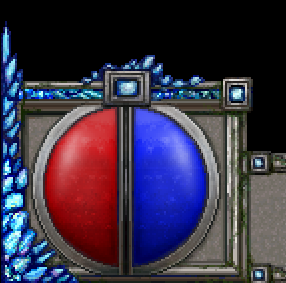
- The health and mana bars are now in the bottom left.
- The experience bar has now shifted centrally and under the action bar.
- Certain things have been cleaned or omitted in the redesigning - such as the Character Profile/Name and Extra Strikes.

Bottom Middle:
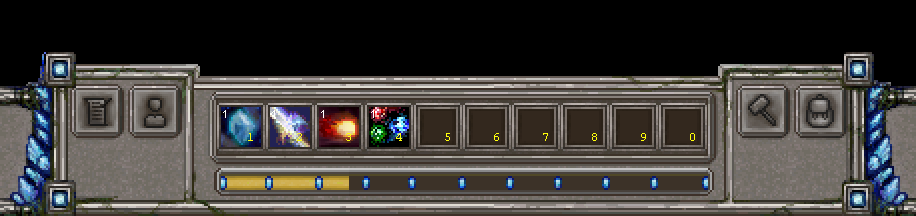
- The action bar still remains in the same position.
- Other key option buttons are now worked to sit around the action bar frame.
- Experience bar now sits below.

Bottom Right:
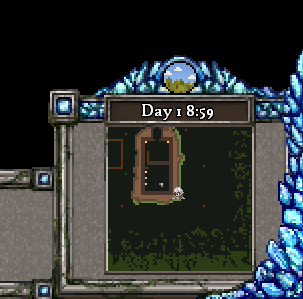
- The Map, Day & Time information has moved to the bottom right.
- Certain things have been cleaned or omitted in the redesigning - such as the Building Edit indicator and NPC conversation indicators.

And below is a full screenshot, showing the HUD as it fits altogether:
Cheers!
Phill

More from Shards of Azuria

Other announcements

All news
In-game event4 Dec 2022Build 11Hi all! The focus of this build has been in reworking the overall look and feel of the UI. To start with, we have re-done the Character, Crafting and Inventory screens. We hope these changes are a step in the right direction and are looking forward to doing similar improvements. Character Screen: - Functionally this should feel similar, but we hope the overall feel of the screen is improved. -…Game update4 Sep 2022Build 10.2.1- Re-fix to ensure the Worlds are generating correctly.In-game event4 Sep 2022Build 10.2Hi all! This build includes fixes, sound work and UI changes. Build 10.2 Change Log: · Change to allow for different sized enemies to have different sized hit boxes. This in particular relates to being able to more easily melee them. · Fix to ensure the XML\Maps directory exists when attempting to create a World. · Fix to correct the name of Alris on the conversation UI window. · Changed the in…