Font options are here! Along with the original font, there's now a new font with similar metrics to the original but with curves instead of blocky corners. There's also an updated version of the original font with some tweaks and more consistency, but the unmodified original font is still selectable if you prefer it. That makes a total of three fonts, with the potential for more being added later.
This update also makes a number of changes to the game's overall appearance, some slight and some significant. A full list of the changes made can be found below.
New fonts
- An option has been added to change the font in use. It can be found at (Settings > Appearance > Font).
- A new font, called "curve font", has been added to the game as an option.
- A modified version of the original font, listed as "block font (new)", has been added to the game.
- A new option allows you to choose whether or not you want to always use a scaled higher resolution font.
- Each font has a high resolution version, which is scaled up or down to match the game's current resolution settings. At lower game resolutions, though, smaller custom versions of the fonts are used instead, unless this option is enabled.
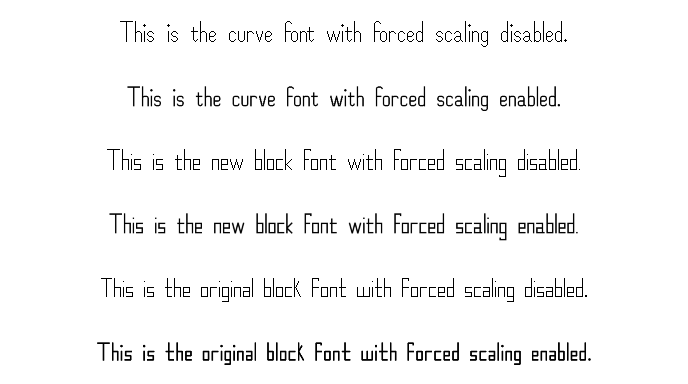
A comparison of the three fonts with forced scaling on and off at 1080p:
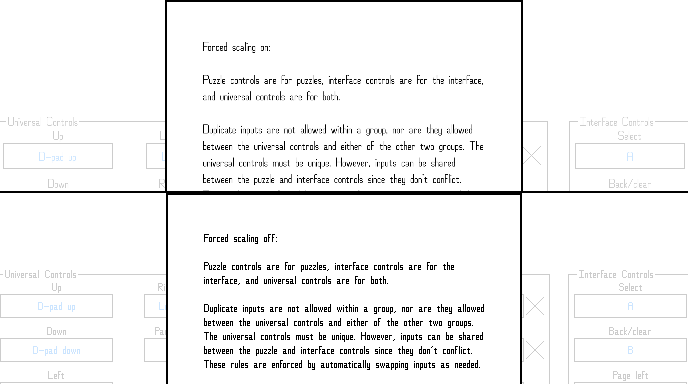
Forced scaling doesn't work as well at low resolutions:
Puzzle hints changes
- Puzzle hints are now evenly spaced for both rows and columns.
- Puzzle hints are now automatically sized to closely match the size of the puzzle squares.
- Puzzle hint highlights are now consistently sized to match the puzzle squares.
Other appearance changes
- Improved puzzle grid sizing and placement.
- Improved puzzle select button sizing and placement.
- The button size is now more consistent between resolutions, and the buttons are now centered vertically in the screen/window.
Settings changes
- Changed "Options" to "Settings" for consistency.
- Rearranged display, appearance, and puzzle appearance settings.
- Added a new sub-menu of "Other appearance options" to make room for the new font settings, with a number of the appearance options having been moved there.
- Added a link to puzzle appearance settings to the appearance menu. It can now be accessed both by (Settings > Puzzle > Puzzle appearance) and (Settings > Appearance > Puzzle appearance).
- Changed other five-line related options to be greyed out when five lines themselves are disabled.
Other changes
- Removed the fade in effect of the intro HopefulToad logo screen, and changed the fade out effect to be skipped when the intro screen is skipped to make getting to the main menu faster.
- Removed unused lines of text from the game.
- Replaced references to "the below example" in one of the tutorials with "this example," since the examples in question are actually above the text, not below it.
- Changed some info pop-up text for clarity and consistency.
- Changed text in dialogs and in tutorials to auto-wrap instead of using hard-coded newline locations.
- Ensured that the most recently selected puzzle button will always be selected upon re-entering a puzzle select scenario, no matter what settings have been changed mid-puzzle.
- Fixed an issue where, at the main menu at certain resolutions, if the settings menu was closed via mouse and the mouse wasn't moved, clicking wouldn't change the currently selected main menu button to the one the mouse was hovering over.
More from Nonozle
Other announcements
3.02.03 patch notesThis update moves most of the new settings that were added in the April Fools' Day update into their own sub menu, "Silly settings". This includes the following settings: · Random square modification · No hints · Earn Nonobucks for solving puzzles · Happy squares · Tiny text mode · ALL CAPS MODE!!!! · all lower case mode · Title Case Mode The only option that was left in its place was "Show puz…4.01.25 patch notesUpdate 4.01.25 includes a number of exciting new settings! Random square modification For those craving some more challenge when solving a puzzle, this new option (located at Settings > Puzzle > Random square modification), when enabled, causes a random square to be randomly changed at random intervals! Sure to keep you on your toes! No hints If that's not enough, for the truly hardcore, a new…3.02.02 patch notesThis update adds two new options, both under Settings > Appearance, designed to help with legibility on small screens. The first (Menu text size increase) allows you to increase the relative size of most of the text of the game by up to two increments. In some places (control editor screens, sound and playlist screens, and so on), the text of some buttons is automatically sized to fit the scree…