Ahoy Pathfinders!
With the new season, we have an updated Server Grid Editor (SGE) available for unofficial server owners. We wanted to ensure making a map was as easy as possible to all players, so we have added the ability to export and import server layouts. Players will be able to export/import grid layouts from season 10 or another personal layout they prefer. It should be noted that this feature and update is optional!
To download the latest Server Grid Editor (SGE) click the the following link: SGE download
Exporting Grids
- Open up an instance of the SGE and load a project that you want to take grid layouts from.
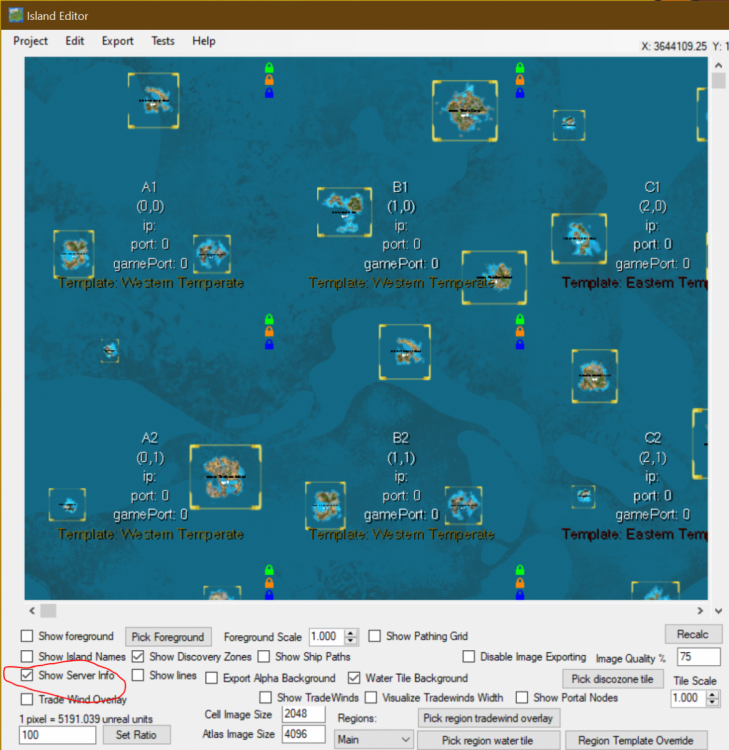
- Be sure to have ‘Show Server Data’ checked to see all the server coordinates
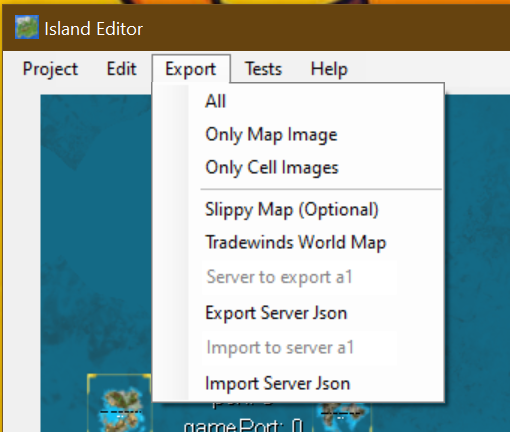
- Go to the export tab and you’ll see new options with text fields above them:
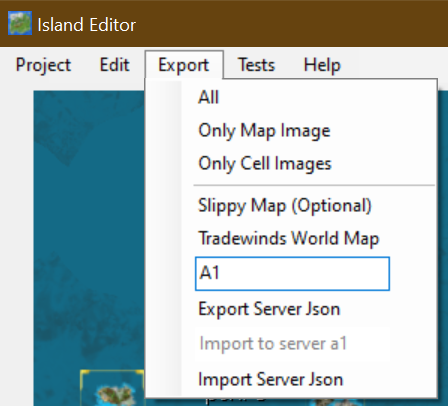
- Export Server Json (this section will be covering this)
- Import Server Json (next section)
- In the text field above ‘Export Server Json’ type in the server you want to export in alphanumeric format like A1 or M12 not the numerical coordinates such as (0,0) or (12,12) respectively.
- NOTE: you cannot bulk choose servers, it has to be one at a time. Do not try to use lists like A1,B2,C3 as it will not work.
- Once the server you want to export is typed in click ‘Export Server Json’ and an explorer window will open.
- Save that file wherever you will find it and leave the syntax as its default (It will be something like: ServerGrid_B2).

- Repeat steps 3-6 with all servers you are interested in exporting/importing.
- NOTE: The data you are exporting will include Discovery Zones, Server Data and Island Data (instances, overrides and positioning).
- Close this editor or File -> Open the project you are importing to.
Importing Grids
- Open up an instance of the SGE and load a project that you want to take grid layouts from.
- Be sure to have ‘Show Server Data’ checked to see all the server coordinates.
- Go to the export tab and you’ll see new options with text fields above them:
- Export Server Json (Previous section)
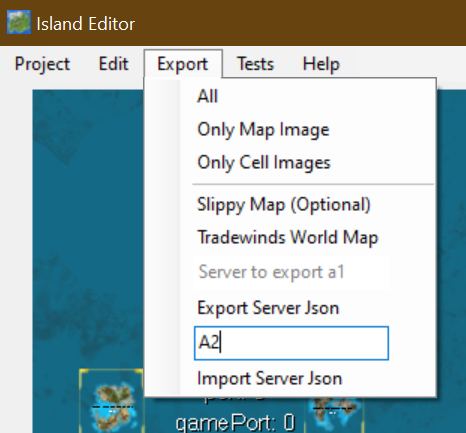
- Import Server Json (This section)
- In the text field above ‘Import Server Json’ type in the server you want to overwrite with an export in alphanumeric format like A1 or M12 not the numerical coordinates such as (0,0) or (12,12) respectively.
- NOTE: Same as last time, you cannot bulk choose servers. It has to be one at a time. Do not try to use lists like A1,B2,C3 as it will not work.
- Once the server you want to overwrite is typed in, click ‘Import Server Json’ and an explorer window will open.
- Navigate and choose the “ServerGrid_Server.json” file you want to import and hit ‘Ok”
- It will replace the layout and information of the Grid you entered in step 4.
- Repeat steps 3-7 for all other grids.
- Save your project.
Final Note
Again, we would like to emphasize that ATLAS is still in Early Access, meaning many things can and will likely continue to drastically change - even in the middle of development. Anything discussed is only up to date as of the moment it is posted. Features and changes that ultimately make it to the next patch, as well as timing, may be different from what was previously discussed.
As always, we appreciate the suggestions and feedback from the community. Please keep them coming! Thank you for all of your support! :)
Happy Sailing,
- ATLAS Crew
Natter n' chatter on Discord: https://discord.gg/playatlas
Hear ye, hear ye on Twitter: https://twitter.com/sailtheatlas
Watch us scallywags on Twitch: http://twitch.tv/sailtheatlas
Plus ye can band with us Pirates on Facebook: https://www.facebook.com/playatlasgame