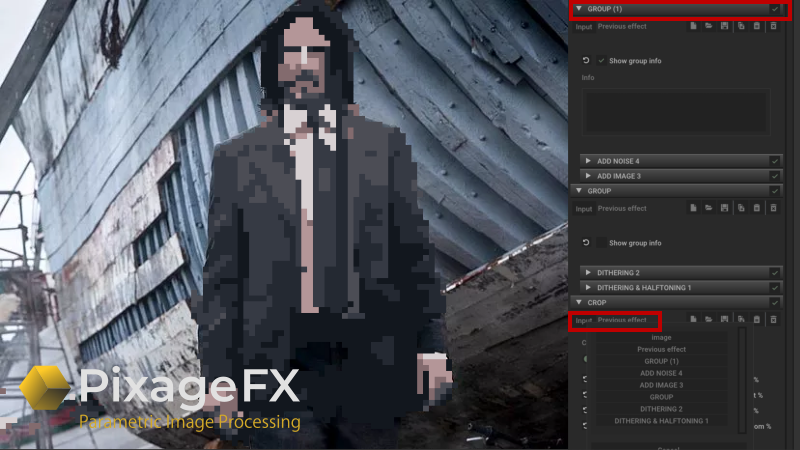
With this version we've added new features to PixageFX that allow you to create even more complex effects.
You can now change the INPUT image of any effect. The workflow, which previously worked only in a top-down order, now allows you to select a different INPUT Source at any step.
We've also added a new effect to support this workflow: CLONE
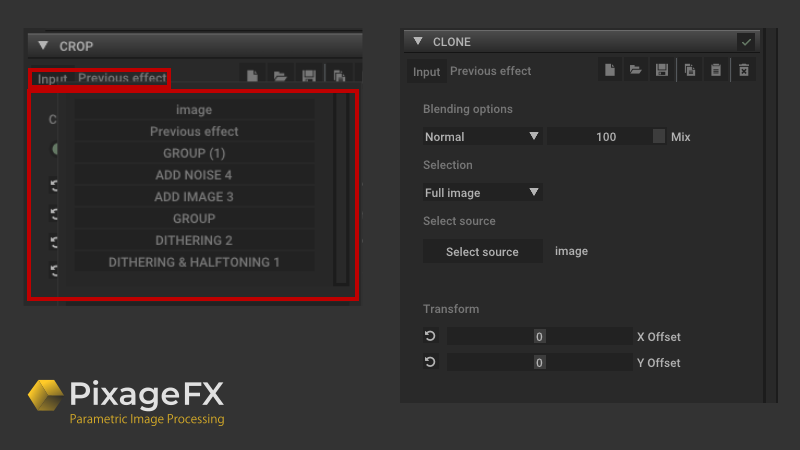
With Clone; you can blend an INPUT image with a different image at any step.
You can also group your effects with the new Grouping feature. You can change the order as a group.
We've added an automatic numbering to the EFFECT CAPTION if you add another one of the same effect you've added.
More from PixageFX Studio
Other announcements
Exclusive PyxelAid Launch Discount for PixageFX Owners!Thank You, PixageFX Community! ❤️ Since the release of PixageFX, thousands of artists have used it to create amazing pixel art. Your support has made it possible for me to build something even bigger. I'm excited to announce that PyxelAid is coming soon! PyxelAid is a brand-new toolkit dedicated entirely to pixel art conversion, restoration, cleanup, scaling, batch processing, AI-powered tools,…Exclusive PyxelAid Launch Discount for PixageFX OwnersThank You, PixageFX Community! ❤️ Since the release of PixageFX, thousands of artists have used it to create amazing pixel art. Your support has made it possible for me to build something even bigger. I'm excited to announce that PyxelAid is coming soon! PyxelAid is a brand-new toolkit dedicated entirely to pixel art conversion, restoration, cleanup, scaling, batch processing, AI-powered tools,…1.1.3.1 is out! New Category, new modules, bug fixesAdded : New Category : Pixel Art Helpers Added new module : Banding Reduction : Detects and reduces visible color banding caused by parallel pixel repetition. Preserves line continuity while softening unwanted stripe patterns. Added new module : Diagonal Smoothing : Fixes jagged diagonal lines caused by pixel stair-stepping.Smooths only true diagonal artifacts without blurring straight edges or…