Hello controllers!
This update intends to adjust the game's difficulty, including game speed changes. New maps will be added in the next update.

Traffic Flow
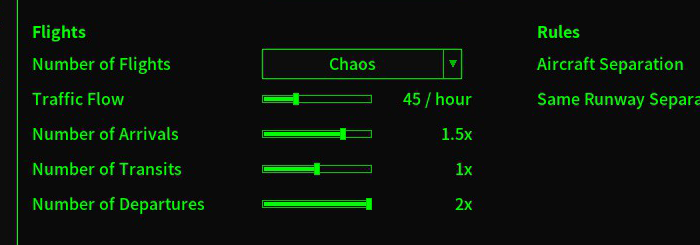
This new game setting determines the average number of flights spawned per hour.
Route+
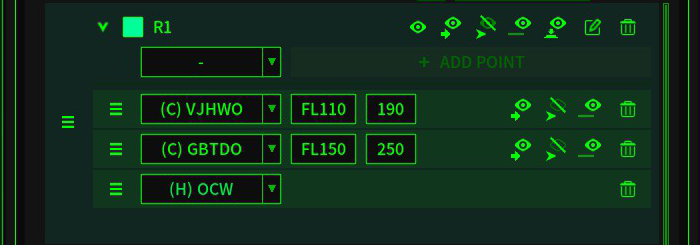
An altitude and speed can be assigned to a nav point in a route. An aircraft will automatically fly assigned altitude and speed after passing the nav point.
Game Speed
Reduce the slowest game speed closer to real-time and adjust other game speeds.
The new game speed options are 1x, 2x, 10x, 20, and 100x.

- The maximum speed in the shortcut editor is 250kts.
- Nav point buttons are not updated when selecting another aircraft.
- Some functions are not working after the second time loading a game in one session.

- Add a traffic flow game setting
- An altitude and speed can be assigned to a nav point in a route.
- Tweak the maximum number of flights and default traffic flow settings.
- A route and procedure cells can be collapsed on the management screen.
- Change elements and tooltips in the new game setting screen.
- A nav point will be highlighted on the map when clicking it on the Management screen.
- Change the background color of the save-replay screen and the load-replay screen.
- Change the save game screen and the save replay screen.
- Other UI tweaks.
- Improve performance.
Thank you all for your support, feedback, and bug report.
If you have questions, suggestions, or bug reports, join the Discord server, or start a new discussion in the steam community.

More from Air Traffic: Greenlight
Other announcements
V2.14.6 Patch 6 NoteRewrote the in-game window system to improve performance and maintainability. · Updated cursor graphics for better visibility. · Made various UI adjustments and polish. Thank you all for your support, feedback, and bug report. If you have questions, suggestions, or bug reports, join the Discord server.V2.14.6 Patch 5 NoteHello controllers! This patch addresses some issues caused by the UI adjustments in the last update. One of the changes in the previous patch was disabling stretch scaling in high resolutions to preserve the original UI element ratios. However, this could result in text appearing too small on certain screens. As a temporary workaround before the implementation of adjustable UI text size in the…V2.14.6 Patch 4 Hotfix NoteFixed: Missing terrain data in New York and Los Angeles Thank you all for your support, feedback, and bug report. If you have questions, suggestions, or bug reports, join the Discord server.