Status
SteamPeaks
ChartsSalesUpcomingPatchesNewsCalculator
New on SteamEvery app, DLC and depot the minute Steam creates itAppsEvery app on Steam, newest change firstPackagesSubs and bundles, and what each containsDepotsDepots, manifests and install sizesTagsSteam's user tags and the games under themDevelopers & publishersCompanies and their cataloguesTechnologiesEngines, SDKs and anti-cheat found in the filesChange historyEvery PICS changelist as it lands
SignalsNineteen readings of the whole catalogueCompareAny games side by sideRecordsAll-time peaks and the days they were setReportsWeekly and monthly write-upsAlerts & newsroomWatch a game, get told when it movesSteam statusIs Steam up, right nowWeb API explorerTry the endpoints in the browser
NewsSteam's own announcements and the sales calendarCalculatorWhat a Steam account is worth, and its pile of shame
/
Sign in
/
SteamPeaks
The ultimate resource for Steam data.
ExploreChartsSalesSales and festsUpcomingPatchesNewsRecordsTrendingSignals
DatabaseAppsPackagesDepotsTagsDevelopersTechnologiesChange history
ToolsCalculatorCompareSearchAlertsSteam statusAPI
SiteMethodologyFAQDiscordSupportSign in via Steam
Not affiliated with Valve or Steam. Game names and artwork belong to their owners. All times UTC.
PrivacyCookiesFair useStatus
Red Stone OnlineNews[Notice]Steam Log-in Guide, Password Reset and others
Game update

[Notice]Steam Log-in Guide, Password Reset and others

Red Stone Online · published 7 Apr 2022, 06:44 UTC

All newsPlayers around this dateRead on Steam

Hello, players of Red Stone.

We have been receiving many 1:1 inquiries related to the log-in issue. Many new, old players seem to struggle, especially when the player was using their Steam account to log in.

So we would like to post a guide about the Steam account registration, and log-in process. If you are playing from Steam, please follow these steps.

Steam Version Registration Process

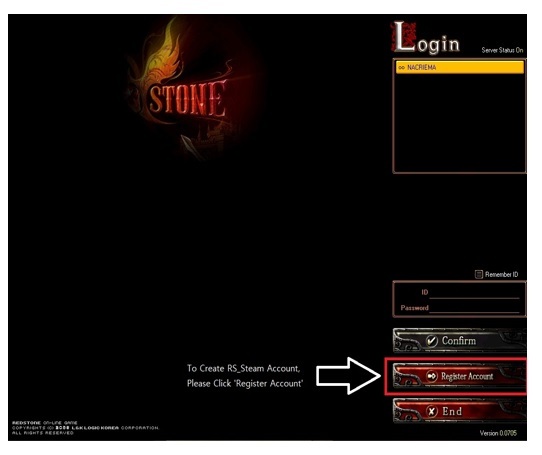
  1. Launch Red Stone online through Steam.
  2. Click 'Register Account' (Please be aware that the registration process must be done in Steam Client)
  3. Follow the Email Confirmation registration process. (Not on our official homepage, in the Steam client)
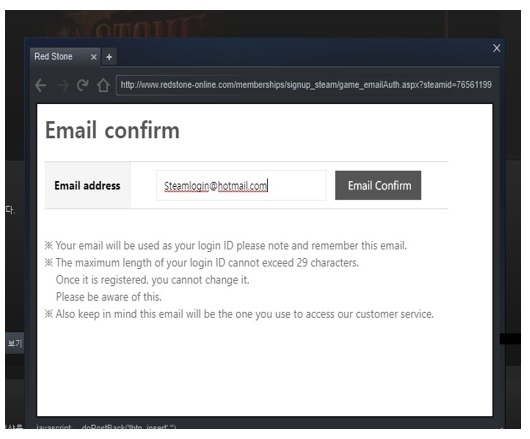
  4. Type the account and password that you have created.

If you don’t see the verification and registration page through Steam, then follow this process.

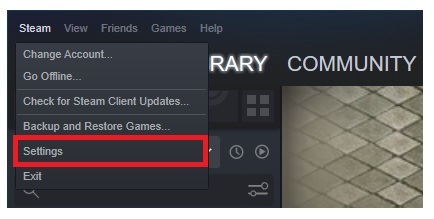
  1. From your Steam window (If you launch the game Shift + Tab), Click ‘Steam’ on the top-left hand side corner.
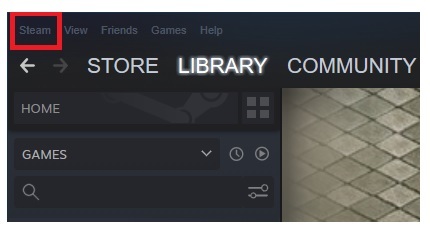
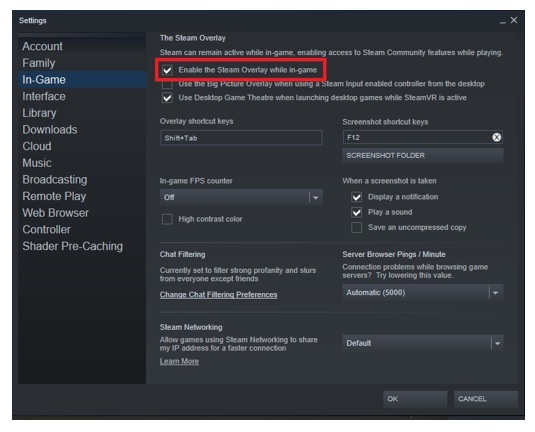
  2. Click 'Settings', and then go to 'In-Game' Tab.
  3. Check the 'Enable the Steam Overlay while in-game’
2. Account Password Reset

If you wish to find a lost or forgotten password, you can fine one by resetting your password. It applies to all Steam, L&K client users.

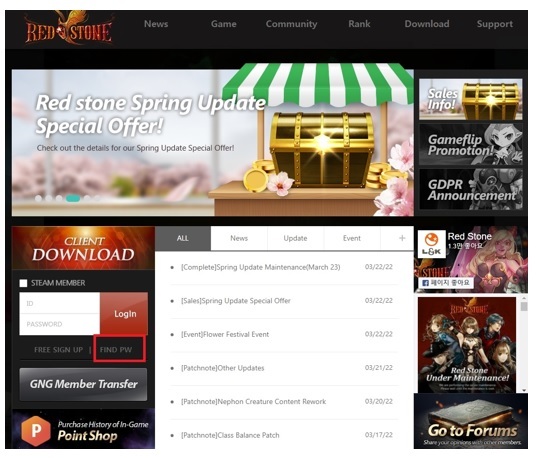
  1. Visit our official Red Stone online homepage
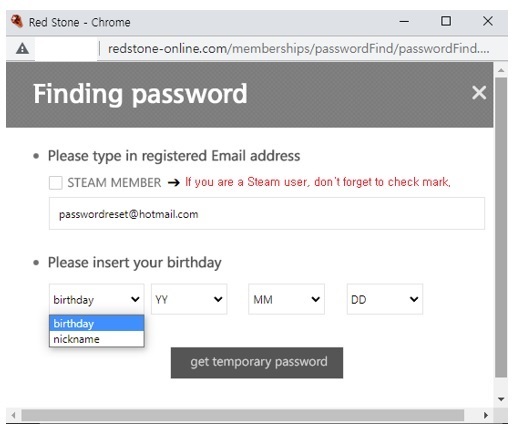
  2. Click ‘Find PW’
  3. Type your registered Email address (Email account) that you use to log in to the game and our official homepage.
  4. Choose the birthday or nickname of your account. If you are a Steam user, be sure to check 'STEAM MEMBER' before you type the information.
  5. Click ‘get a temporary password and follow the process.
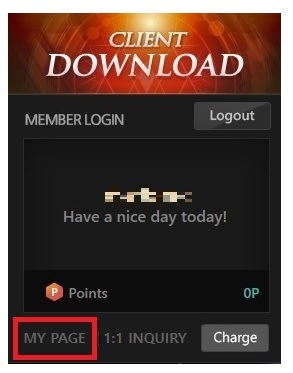
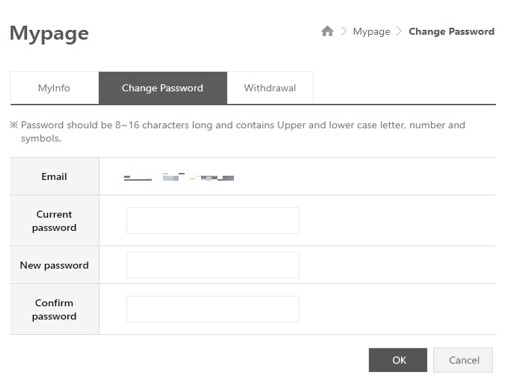
  6. Log in with your temporary password-> click ‘my page’ -> proceed with your 'change password' process. If the link in the email doesn't work, try to do it manually.
Things to keep in mind

※ L&K and Steam version of Red Stone are not compatible. They do not share account information. (ie. You cannot log into Steam version of Red Stone with L&K account, and vice versa.)

※ All registration process for a Steam user must be done in the steam client. If you are planning to use Steam to play the game, do not register manually by visiting our website.

※ Please remember that we do not disclose or alter any personal information collected from customers as stated in our Privacy Policy. As information regarding your web/game account security detail is included in personal information, we do not provide account transfer, password reset, or temporary password directly without following standard procedure.

※ Even if you send a screenshot through a 1vs1 inquiry and try to prove that you are an owner account, we can't provide any account information. If you can't remember the nickname and birthday of your account. Please understand that we can't help you for recovering your account and the password.

Thank you.

Best Regards,
Red Stone Online

More from Red Stone Online

Other announcements

All news
Steam news10 Sep 2026[Event] September Hunting Event, Limited-Time Sales & GM Events\ Events, Limited Offers & GM Events Hello Adventurers! A variety of events, limited-time items, and GM events are coming to Red Stone this September! Hunt monsters to collect special event currency, check in every day for rewards, explore the September Limited Offers, and take part in various GM events throughout the month. Check out what’s waiting for you below! 🎉 September Events 1. Hunter'…Community9 Sep 2026Server Maintenance (Sep-09)Hello, Adventurers! Server maintenance will be held during the following time. The maintenance will last for 6 hours 30 mi n -> 2 hours 30 min \ - (Game) 2026/09/09 16:30 ~ 2026/09/09 23:00 ->19:00 (in-game time, UTC-8) - (Web) 2026/09/09 16:30 ~ 2026/09/09 23:00 ->19:00 (in-game time, UTC-8) \ - Server Maintenance - GM Event Reward Distribution - Hunting Event - New Limited Offer \ > Star Reve…Community2 Sep 2026[Maintenance, Revised] Server Maintenance (Sep-02)Hello, Adventurers! Server maintenance will be held during the following time. The maintenance will last for 2 hours 30 min -> 1 hour \ - (Game) 2026/09/02 16:30 ~ 2026/09/02 19:00 -> 17:30 (in-game time, UTC-8) - (Web) 2026/09/02 16:30 ~ 2026/09/02 19:00 ->17:30 (in-game time, UTC-8) \ - Server Maintenance - GM Event Reward Distribution \ GM Event Reward Distribution 1. Boss Suppression Suppor…