Status
SteamPeaks
ChartsSalesUpcomingPatchesNewsCalculator
New on SteamEvery app, DLC and depot the minute Steam creates itAppsEvery app on Steam, newest change firstPackagesSubs and bundles, and what each containsDepotsDepots, manifests and install sizesTagsSteam's user tags and the games under themDevelopers & publishersCompanies and their cataloguesTechnologiesEngines, SDKs and anti-cheat found in the filesChange historyEvery PICS changelist as it lands
SignalsNineteen readings of the whole catalogueCompareAny games side by sideRecordsAll-time peaks and the days they were setReportsWeekly and monthly write-upsAlerts & newsroomWatch a game, get told when it movesSteam statusIs Steam up, right nowWeb API explorerTry the endpoints in the browser
NewsSteam's own announcements and the sales calendarCalculatorWhat a Steam account is worth, and its pile of shame
/
Sign in
/
SteamPeaks
The ultimate resource for Steam data.
ExploreChartsSalesSales and festsUpcomingPatchesNewsRecordsTrendingSignals
DatabaseAppsPackagesDepotsTagsDevelopersTechnologiesChange history
ToolsCalculatorCompareSearchAlertsSteam statusAPI
SiteMethodologyFAQDiscordSupportSign in via Steam
Not affiliated with Valve or Steam. Game names and artwork belong to their owners. All times UTC.
PrivacyCookiesFair useStatus
Puzzle TogetherNewsApril Update
In-game event

April Update

Puzzle Together · published 5 Apr 2022, 18:04 UTC

All newsPlayers around this dateRead on Steam

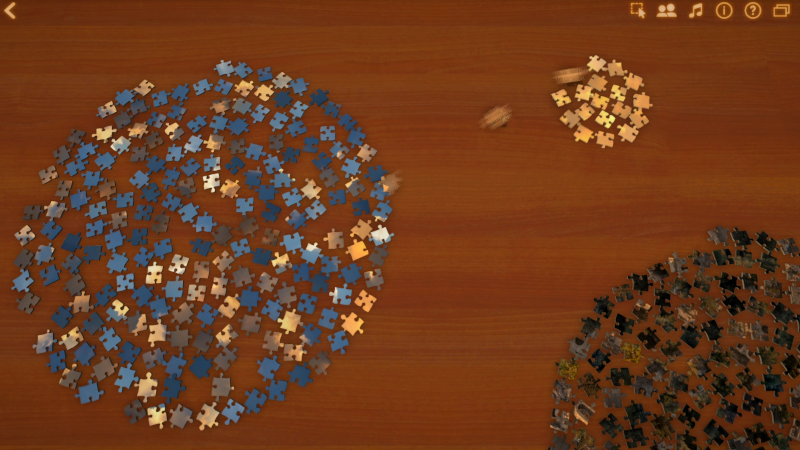
This month's update refines the selection system and adds a new sort feature. The two changes work together to make it a lot easier to group together the pieces you're looking for.

First, when you enter select mode (by pressing the button with a arrow drawing a box) you can now press on individual pieces to select or deselect them. This is in addition to being able to draw a box around a group of pieces to select them all. Being able to select individual pieces makes it easy to, for example, select all the pieces that appear to be part of a particular object.

Next, a new sorting option has been added, called Spread. This takes all of the pieces (or if you've selected pieces, then it just takes those) and arranges them neatly in a circle. One use for this is to layout all of the pieces at the start of a puzzle, so that none are overlapping.

These two new features can be used together to make it easy to sort together the pieces you want to work with. Enter selection mode and click on all the pieces you want, for example each piece that is part of a certain object. Then use the Spread option to arrange all of those selected pieces together in a neat group, at the place on the table where you'd like to work with them.

Finally, another recent change requires that a player in an open puzzle connect several pieces together before they will be allowed to place pieces in their final position on the mat. This is to prevent 'trolls' from going into an open puzzle, taking large groups of connected pieces that players are working on, and placing them permanently in position on the mat -- which makes it much harder for the players to continue working on those sections. Now players who are new to an open puzzle will need to put some work in before they can place pieces in their final position, work that trolls usually don't have the patience for.

Fun facts: over 900,000 puzzles have been completed in Puzzle Together, and over 347,000,000 pieces have been connected... so far!

More from Puzzle Together

Other announcements

All news
Major update26 Nov 2024Hundreds of New PuzzlesThis year-end update has something for everyone. Here's what you can expect: · 400+ new puzzle images, covering a wide variety of subjects and styles, and all created by human photographers and artists. For easy access, most of these new puzzles are separated out into their own categories, such as "Animals II", "Buildings II", etc. You can see all of the new additions by selecting New from the…Major update17 Apr 2024April UpdateToday's update was a long time coming, and adds some exciting new features while also fixing a bunch of troublesome bugs. Here's what's new: New Features · When generating a custom puzzle image, there is now a menu that lets you choose from 30 different styles. Choose "General" if you'd rather describe the style yourself, or choose "Classic Style" if you'd like to stick with the style Puzzle To…In-game event15 May 2023May UpdateThis month's update improves the search function, and fixes some bugs. Here are the details: - The search function now shows matching results from Puzzle Together's whole puzzle library, not just the collection of AI generated images. Also, the AI images that it does show are higher quality than before. - Fixed an issue with the database that would cause problems connecting to the game each day…