Status
SteamPeaks
ChartsSalesUpcomingPatchesNewsCalculator
New on SteamEvery app, DLC and depot the minute Steam creates itAppsEvery app on Steam, newest change firstPackagesSubs and bundles, and what each containsDepotsDepots, manifests and install sizesTagsSteam's user tags and the games under themDevelopers & publishersCompanies and their cataloguesTechnologiesEngines, SDKs and anti-cheat found in the filesChange historyEvery PICS changelist as it lands
SignalsNineteen readings of the whole catalogueCompareAny games side by sideRecordsAll-time peaks and the days they were setReportsWeekly and monthly write-upsAlerts & newsroomWatch a game, get told when it movesSteam statusIs Steam up, right nowWeb API explorerTry the endpoints in the browser
NewsSteam's own announcements and the sales calendarCalculatorWhat a Steam account is worth, and its pile of shame
/
Sign in
/
SteamPeaks
The ultimate resource for Steam data.
ExploreChartsSalesSales and festsUpcomingPatchesNewsRecordsTrendingSignals
DatabaseAppsPackagesDepotsTagsDevelopersTechnologiesChange history
ToolsCalculatorCompareSearchAlertsSteam statusAPI
SiteMethodologyFAQDiscordSupportSign in via Steam
Not affiliated with Valve or Steam. Game names and artwork belong to their owners. All times UTC.
PrivacyCookiesFair useStatus
Planet Evolution PC Live WallpaperNewsDisplay Selector is ready!
In-game event

Display Selector is ready!

Planet Evolution PC Live Wallpaper · published 18 Jul 2019, 00:12 UTC

All newsPlayers around this dateRead on Steam

Many users with many screens asked for features to select only one screen to display our project. It was our priority to add such a possibility.

It works after a big fight with the Windows code!

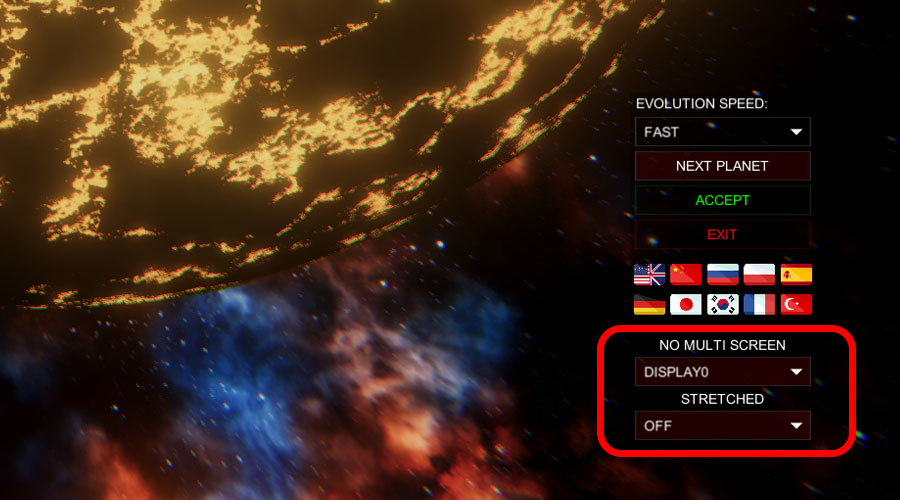
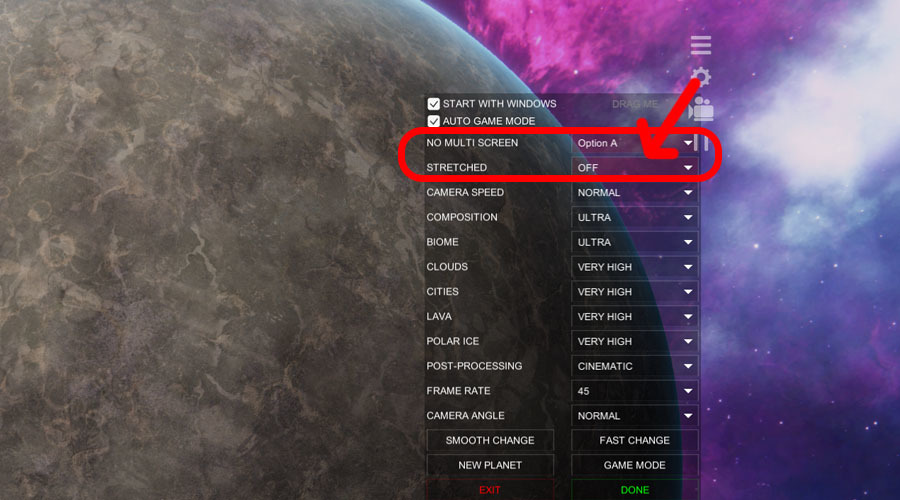
When you start the wallpaper for the first time, a window is displayed where you can select the detected screen. The same function is available in the menu if someone wants to change the screen.

Run the first menu:
In the menu:
Attention

Unfortunately, after this update, you will probably lose your background settings. We are sorry :( :( :(

If you do not see any new features (probably the automatic update is disabled), you should uninstall the wallpaper and reinstall it.

It's not all.

We have added the "Auto Game Mode" which automatically pauses the wallpaper when you turn on the normal game full screen. It automatically gives you 100% of your PC's performance for your favourite games.

The wallpaper recognizes another application / the game is in full-screen mode and then turns off. When you turn off the game, the wallpaper automatically appears on your screens.

Attention

Some games do not turn on "real" full-screen mode, so our wallpaper does not turn off. Before you turn on such a game, you need to press the "GAMEMODE" button on the background image itself to get 100% power.

Thank you for your support. Thanks to you, we are constantly developing our projects.

3DM

More from Planet Evolution PC Live Wallpaper

Other announcements

All news
Community23 Dec 2023WINTER SALE! Discounts for YOU!Feel free to change your wallpaper to something interesting. This is the best time to download my unique designs at such a low price. Hello everyone and we wish you a Happy Holidays and an awesome 2024. My name is Greg and I am the founder of 3DM whose goal was to design and release unique designs as wallpapers on the Steam platform...and we did it. :D 3DM is not a company with offices and a te…Esports15 May 2022The new wallpaper game is coming soon.Desktop Mars will be released soon in Early Access. Please, consider adding it to your Wishlist to be on time. Desktop Mars is my new project where we combined constructive game and live wallpaper, all in the style of Minecraft / Voxel. Build, collect, upgrade and expand your new population on Mars before Elon Musk does! Main features: -No rush on time - Build your colony in your style and time…Major update30 Jun 2020Big System UpdateBig System Update We have repaired most / all of our wallpaper systems. Wallpaper design turned out to be something more difficult than we thought. Animated wallpapers for Windows 10 require some system settings. Despite many of our messages, someone still missed them and problems began. After many tries, it's Big System update is ready. Most problems have probably been fixed. 90% of negative r…