Versus mode is back, giving FMFC members the opportunity to challenge each other for the ultimate online bragging rights after returning as part of the FM22 (PC/Mac) Main Winter Update.
Never played Versus mode before when it was a part of Football Manager Classic or Football Manager Touch? Want to know how to get the most from this exciting, new multiplayer experience? This guide will walk you through absolutely everything, from how to get started to all the different competitions you try and where to go if you get stuck.
What is Versus mode?
Versus mode allows players to test themselves and their teams against other managers in a head-to-head environment to prove their Football Manager skills to their friends and the world. Players can export their favourite teams from Career mode to use in Versus mode or choose a team from any of the playable leagues. Versus mode is a streamlined game mode which can be played online, as a hotseat game, or as a single player experience against the AI.
Signing in or Signing up to FMFC
As we mentioned at the top, the new-look Versus mode is an exclusive for our FMFC members. If you’re already a member, you can head down to the next section to find out how to start playing.
If you’re not yet part of the FMFC squad, you can sign up here or from the FM22 start screen. As soon as you’ve registered, you’ll be able to access Versus mode in FM22.
How to access Versus mode from the FM22 start screen
When you load up FM22 (Steam/Epic/Windows Store), you’ll see a panel at the bottom that prompts you to sign in (or sign up) to FMFC. Click on that and enter your details – once that’s done, your account and game will be synced.
At this point, you’d take the same approach as you would with starting any other game. Click on Start a New Game and then select the bottom-right title for Versus mode – this was previously greyed out and marked as ‘Coming Soon’. Of course, if one of your friends has already set up a challenge that they’re waiting for you to accept, select Join Online Game from the start screen and use the search bar.
What game options are available with Versus mode?
Upon entering Versus mode, you’ll be able to work with the Competition Creator to create a custom competition to suit you and your friends. There are four main options at your disposal:
- Knockout (for 2-32 teams)
- Group Stage and Knockout (for 8-32 teams)
- League (2-20 teams)
- 1 vs 1 (2 teams)
Once you’ve created or joined a game, you’ll receive a Welcome Pack including a competition preview and the relevant Cup or Group draws. When the final whistle has gone, you’ll have the quickfire option to play again or the chance to create a brand-new competition.
Regardless of whether you’re battling from bragging rights with your friends or honing your skills in some practice games with the AI, the streamlined game and match flow in Versus mode means you’ll be to focus solely on playing matches.
Can I use the team from my current save?
Absolutely, that’s one of the great things about Versus mode. You and your friends can take your teams from 20 years in the future, packed full of newgen Wonderkids, and prove who’s really the better manager.
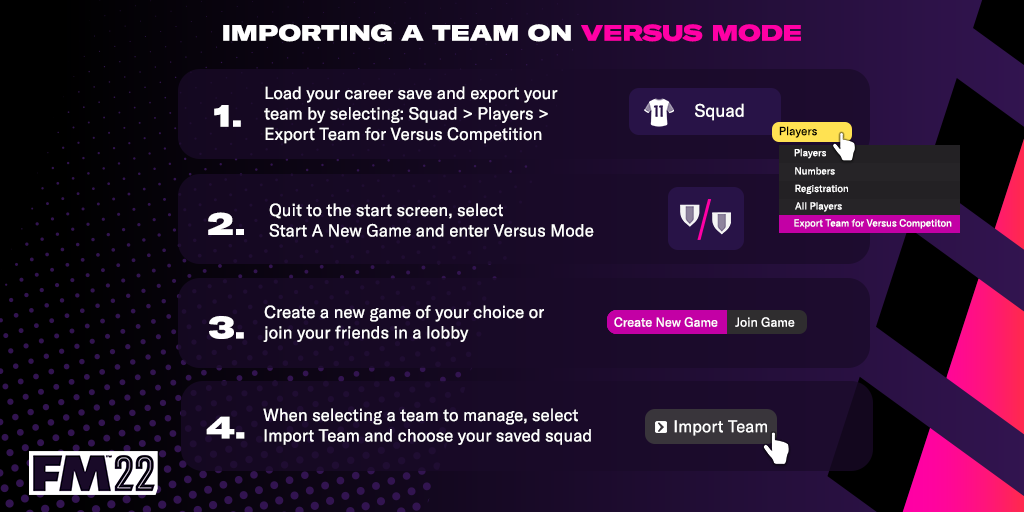
In order to do this, you’ll need to load up your single player career beforehand and export your team. Doing this also exports your current tactical setup with that team, so there’s no need to do that separately. Then, once you’ve loaded up Versus mode, you’ll be able to import the team you’ve put hours into developing.
There’s no limit to the number of teams you can export, so you could pit a couple of different teams from over the years or across different saves against each other in a league format.
Do I need to be online to access Versus mode?
It is possible to play Versus mode offline, although you will have had to log in to FMFC before going offline to retain access. Likewise, as you would expect, the functionality is slightly reduced when playing offline. While offline you’ll be able to access Versus mode, set up and play a competition against either the AI or a local hotseat manager.
Is there PvP matchmaking available in Versus mode?
Yes. Log-in via FMFC and then click Start a New Game. Once you’ve selected Versus mode from the panel of options, click the Join Game tab. From there you’ll be able to choose ‘Quick Start 1v1’ which will match you with any other FMFC member looking to play a one-on-one match.
Best practice for online matchmaking is for you to use open lobbies. If you opt for friends only or password protected lobbies, your choice of opponents will naturally be more limited. With open lobbies you’ll be able to pick up and play whenever you want.
Is Cross-Play Available for Versus mode?
Yes, you’ll be able to challenge other FMFC members across Steam, Epic, the Windows Store and GamePass. However, this is only possible with FM22. There is no Versus mode cross-play available with Football Manager 2022 Xbox Edition.
Am I limited to what teams can be used in Versus mode?
Every club side available to you in a single player career is active and playable in Versus mode but you cannot select national teams.
What should I do if I have problems logging in to FMFC/accessing Versus mode?
As a first step, consult our dedicated FMFC FAQ.
If the information listed there doesn’t solve your issue, please contact out support team – https://fm22.info/SupportTicket.
What do I do if I can’t find an opponent to play against on Versus mode?
Check out the Game Requests page on our forums (https://community.sigames.com/forums/topic/563023-versus-mode-game-requests/) or Steam (https://steamcommunity.com/app/1569040/discussions/1/) to find other FMFC members on the lookout for a challenge.
What happens if I get connection problems while using Versus mode?
Please contact our support team - https://fm22.info/SupportTicket.