Status
SteamPeaks
ChartsSalesUpcomingPatchesNewsCalculator
New on SteamEvery app, DLC and depot the minute Steam creates itAppsEvery app on Steam, newest change firstPackagesSubs and bundles, and what each containsDepotsDepots, manifests and install sizesTagsSteam's user tags and the games under themDevelopers & publishersCompanies and their cataloguesTechnologiesEngines, SDKs and anti-cheat found in the filesChange historyEvery PICS changelist as it lands
SignalsNineteen readings of the whole catalogueCompareAny games side by sideRecordsAll-time peaks and the days they were setReportsWeekly and monthly write-upsAlerts & newsroomWatch a game, get told when it movesSteam statusIs Steam up, right nowWeb API explorerTry the endpoints in the browser
NewsSteam's own announcements and the sales calendarCalculatorWhat a Steam account is worth, and its pile of shame
/
Sign in
/
SteamPeaks
The ultimate resource for Steam data.
ExploreChartsSalesSales and festsUpcomingPatchesNewsRecordsTrendingSignals
DatabaseAppsPackagesDepotsTagsDevelopersTechnologiesChange history
ToolsCalculatorCompareSearchAlertsSteam statusAPI
SiteMethodologyFAQDiscordSupportSign in via Steam
Not affiliated with Valve or Steam. Game names and artwork belong to their owners. All times UTC.
PrivacyCookiesFair useStatus
DanielX.net Paint ComposerNews0.5.9 Custom Spritesheets
In-game event

0.5.9 Custom Spritesheets

DanielX.net Paint Composer · published 4 Feb 2022, 23:34 UTC · build 8148760

All newsPlayers around this dateRead on Steam

This update adds support for custom spritesheets!
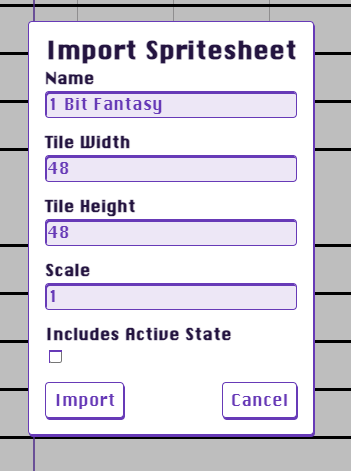
Drag and drop a PNG image into the editor and the "Import Spritesheet" modal will appear.

Choose a name for the spritesheet (this is what will appear in the spritesheet picker dropdown in Settings)

Specify the tile width and height. This is the size of each tile in the PNG image. They must be aligned on a grid.

Specify the scale. The default spritesheet has tiles that are 48x48. If you are uploading a 16x16 spritesheet you can choose 3 and they will be upscaled. For a 24x24 spritesheet 2 would be a good choice.

Choose "Includes Active State" if each tile has a corresponding state for active beneath it in the spritesheet.

The spritesheet can be any number of rows and columns. If the sprtesheet includes active states then each row will be two tiles tall with the default states on top and the active states below.

Here's an example of the default spritesheet. It includes active states. Feel free to use it as a template!

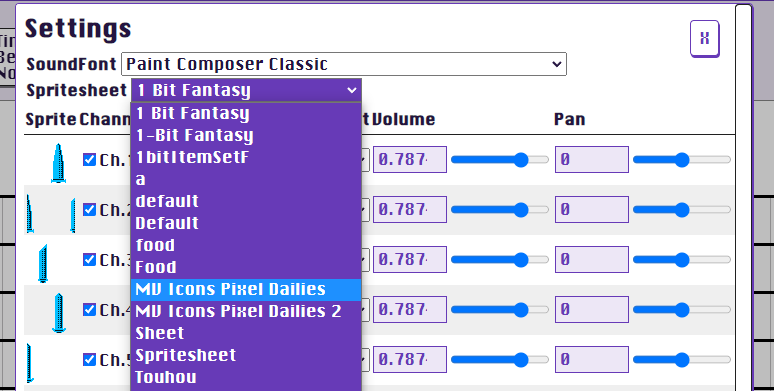
To choose a spritesheet select it from the dropdown in the "Settings" panel:
I hope you enjoy the update!

- Daniel

More from DanielX.net Paint Composer

Other announcements

All news
Game update28 Aug 2026Paint Composer 0.6.0-pre.8Paint Composer 0.6.0-pre.8 New · Two new ways to see your song. A vertical piano roll — notes fall onto a keyboard and light the keys as they sound — and a horizontal roll with the keyboard down the left and time scrolling through a hit line. Press P to cycle staff → vertical → horizontal. Every tool works the same in all three, and your choice is remembered. · The sound bank ships with the gam…Game update18 Aug 2026MIDI Playback Overhaul — Sound Canvas AccuracyFixed: published builds crashed at launch. A required module was missing from the app package; if the previous build wouldn't start, this one will. Playback fixes · Pitch bends now decode the full 14-bit value. Previously every bend read as nearly full-scale down — with a wide bend range set, whole channels could play an octave low. · Drum kits no longer stack every kit layer onto every note (p…Game update17 Aug 2026Update August 17Composer 0.6.0-pre.5 Sound engine · Instruments now have real reverb: every voice feeds a shared reverb bus, so sustained notes and releases sit in a common space instead of stopping dead. · Playback is much closer to how your soundfonts were designed to sound: velocity layers now select the right sample, and hi-hats and other exclusive-class instruments correctly cut each other off. · Stereo p…