Welcome to the January update for the Shoot ‘Em Up Kit. We hope you had a great festive holiday and we wish you all a very happy new year.
Version 2.0.19
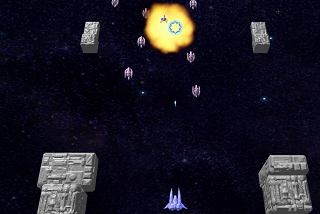
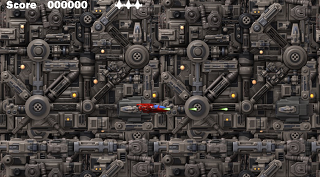
We’re pleased to announce that the Shoot ‘Em Up Kit version 2.0.19 has been released. This includes many fixes and features including template games, which you can use as a starting point for your own projects; and orthographic cameras to use 3D models without perspective – which is perfect for retro-style games.
Version 2.0.19 Release Notes
- New projects can be created from a template.
- Created template projects for side-scroller; vertical-scroller; twin-stick shooter; asteroids; top-down; and invaders style games.
- Tutorials have been created for all template games describing how they were built.
- Added an orthographic option to Camerashots. The orthographic view is only active in-game.
- Added a zoom value to orthographic camera to control the distance to the scene. Higher values make the scene closer.
- Testing a game or level with the Level Settings window open will automatically apply the current values in the level settings.
- Fixed an issue with shadows appearing brighter than they should.
- Fixed an issue with spotlights not fading in intensity.
- The 'Stop' collision action now works correctly.
- Default Input and Movement Definitions are added to new items placed.
- Timers are reset (if required) when the Player respawns.
- Fixed some issues with level copying.
- Fixed an issue that could cause copied items not to be named in sequence.
- Fixed a controller issue that could prevent twin stick input from working correctly.
- Fixed issues with procedural background settings not working correctly.
- Boolean variables are now shown in debug mode.
- Fixed an issue where changing the scale didn't affect the sprite in the Entity Editor.
- Tag positions are automatically adjusted when a sprite is scaled in the Entity Editor.
- Fixed an issue that prevented loading an autosave.
- Fixed an issue that could fire two bullets when the analogue stick was at specific angles.
- Items can now be pasted in the level when the Definition Editor is open; but not while the Definition Properties window is open.
- Bullet Patterns are now correctly reset when the level restarts.
- Fixed an issue that could allow the Player or NPC to fire after all weapons had been removed.
- Projects saved using "Save As" will appear in the recent project list.
- Flat square entities have a box collision type to match their dimensions.
- Fixed some potential crashes.
Discord
The Shoot ‘Em Up Kit channel on Discord has been revamped and updated, thanks to SpaghettiLord1010. Please drop by and say Hello. https://discord.gg/cCf54z5
Wiki
The wiki pages have been updated for the latest Shoot ‘Em Up Kit update. There are descriptions of the templates as well as full tutorials going step-by-step through how they were created.
We’re continuing to focus on creating content for the wiki pages. Thank you to everyone who has requested tutorials. If there is a tutorial you’d like to see then please let us know.
Website
We will shortly be updating the Tall Studios website, which is long overdue. We are splitting the company website and the Shoot ‘Em Up Kit product pages so that each may become more focused.
We are archiving the Tall Studios forums on the website as they are rarely used and there are options of contacting us via Discord; Steam Forums; Facebook; Twitter; or email via the website.
Many thanks,
The Tall Studios team