Status
SteamPeaks
ChartsSalesUpcomingPatchesNewsCalculator
New on SteamEvery app, DLC and depot the minute Steam creates itAppsEvery app on Steam, newest change firstPackagesSubs and bundles, and what each containsDepotsDepots, manifests and install sizesTagsSteam's user tags and the games under themDevelopers & publishersCompanies and their cataloguesTechnologiesEngines, SDKs and anti-cheat found in the filesChange historyEvery PICS changelist as it lands
SignalsNineteen readings of the whole catalogueCompareAny games side by sideRecordsAll-time peaks and the days they were setReportsWeekly and monthly write-upsAlerts & newsroomWatch a game, get told when it movesSteam statusIs Steam up, right nowWeb API explorerTry the endpoints in the browser
NewsSteam's own announcements and the sales calendarCalculatorWhat a Steam account is worth, and its pile of shame
/
Sign in
/
SteamPeaks
The ultimate resource for Steam data.
ExploreChartsSalesSales and festsUpcomingPatchesNewsRecordsTrendingSignals
DatabaseAppsPackagesDepotsTagsDevelopersTechnologiesChange history
ToolsCalculatorCompareSearchAlertsSteam statusAPI
SiteMethodologyFAQDiscordSupportSign in via Steam
Not affiliated with Valve or Steam. Game names and artwork belong to their owners. All times UTC.
PrivacyCookiesFair useStatus
Bigscreen BetaNewsBigscreen VR update: Input Streaming
In-game event

Bigscreen VR update: Input Streaming

Bigscreen Beta · published 25 Mar 2022, 22:01 UTC

All newsPlayers around this dateRead on Steam

A few months ago we've fully overhauled streaming in Bigscreen with Dedicated Servers and a new low-latency Remote Desktop client. We dramatically increased video/audio quality, latency, and stability. Our new Remote Desktop client has a simple installer, making it easier to use a Windows PC wirelessly on the Meta Quest.

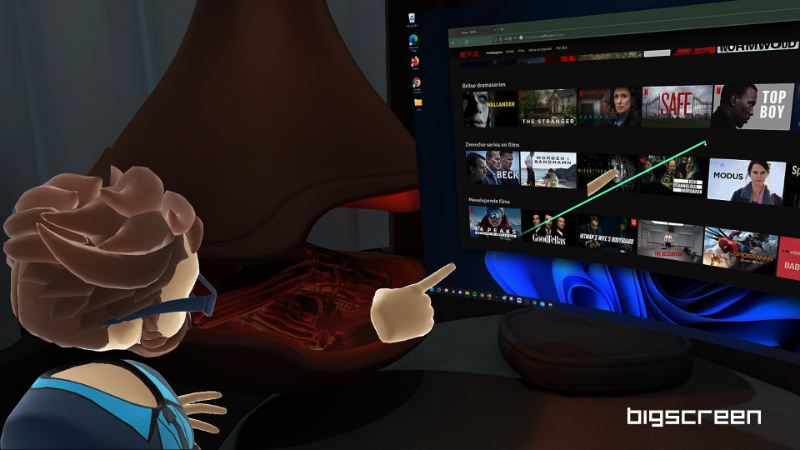
Today, we're excited to release the Input Update! 🖱️

Watch on YouTube

With the Input Update, you can now fully control your PC from your Meta Quest 2 wirelessly! Use your VR controllers to control the mouse cursor and type easily with our virtual keyboard. Great for productivity, browsing the web, and watching videos.

What's next?

Here is what's currently in development and launching in the coming months:

* Bluetooth and Gamepad device support, so you can more easily control your Windows PC
* Built-in YouTube player. Watch YouTube by yourself or together with friends in a VR movie theater
* Friends System with friends lists, easy invites, and more
* New customizable avatars
* Moderation tools and admin controls for room hosts to easily moderate and organize rooms

💌 Leave us a review!

If you love Bigscreen, please leave a review on the Oculus Store or Steam Store! It makes a big difference!

More from Bigscreen Beta

Other announcements

All news
Game update21 Apr 2026Minor bug fixes.Minor bug fixes.In-game event18 Jan 2025Improving the Room Host Experience with NEW Admin Tools🛡️We recently launched a new suite of room options for hosts to control what features users have access to in their rooms! To start off, we added the following options into the room settings menu: · Microphone Settings · Drawing Visibility · Avatar Name Visibility · Avatar Movement · Spawning Toys Additionally, the character limits for room titles and descriptions have increased in the update!…In-game event2 Apr 2024New Premium Environments and Interactable ToysA new update has rolled out which features new premium toys and environments available for purchase in the Bigscreen Shop! This update introduces new features that allow you to spawn toys that can be shared with your friends as well as certain toys that can stick onto a wall or flat surface. We added a few premium toys that feature this system: - 🎯 Darts - 🏎️ RC Car - 📃 Paper Airplane - ♟️ C…