Status
SteamPeaks
ChartsSalesUpcomingPatchesNewsCalculator
New on SteamEvery app, DLC and depot the minute Steam creates itAppsEvery app on Steam, newest change firstPackagesSubs and bundles, and what each containsDepotsDepots, manifests and install sizesTagsSteam's user tags and the games under themDevelopers & publishersCompanies and their cataloguesTechnologiesEngines, SDKs and anti-cheat found in the filesChange historyEvery PICS changelist as it lands
SignalsNineteen readings of the whole catalogueCompareAny games side by sideRecordsAll-time peaks and the days they were setReportsWeekly and monthly write-upsAlerts & newsroomWatch a game, get told when it movesSteam statusIs Steam up, right nowWeb API explorerTry the endpoints in the browser
NewsSteam's own announcements and the sales calendarCalculatorWhat a Steam account is worth, and its pile of shame
/
Sign in
/
SteamPeaks
The ultimate resource for Steam data.
ExploreChartsSalesSales and festsUpcomingPatchesNewsRecordsTrendingSignals
DatabaseAppsPackagesDepotsTagsDevelopersTechnologiesChange history
ToolsCalculatorCompareSearchAlertsSteam statusAPI
SiteMethodologyFAQDiscordSupportSign in via Steam
Not affiliated with Valve or Steam. Game names and artwork belong to their owners. All times UTC.
PrivacyCookiesFair useStatus
ModboxNewsModbox Update + SDK now out!
In-game event

Modbox Update + SDK now out!

Modbox · published 21 Jul 2021, 15:55 UTC

All newsPlayers around this dateRead on Steam

Modbox v2.2022 is now out - which now includes the first release of the Unity SDK for creating new Modbox mods!

SDK


Our SDK is different than other Unity SDKs since you can run Modbox using it - and see/edit the C# code of our own mods. It can be used to create new Modbox mods out of Unity prefabs/scenes, or new components/options with C#, or it could be used as a reference to see how the core components work and their C# source.

The SDK is included as a zip file in the Modbox Steam folder. Check out our docs here on how to use it - and we also recorded a quick video going through it

New Features/Changes


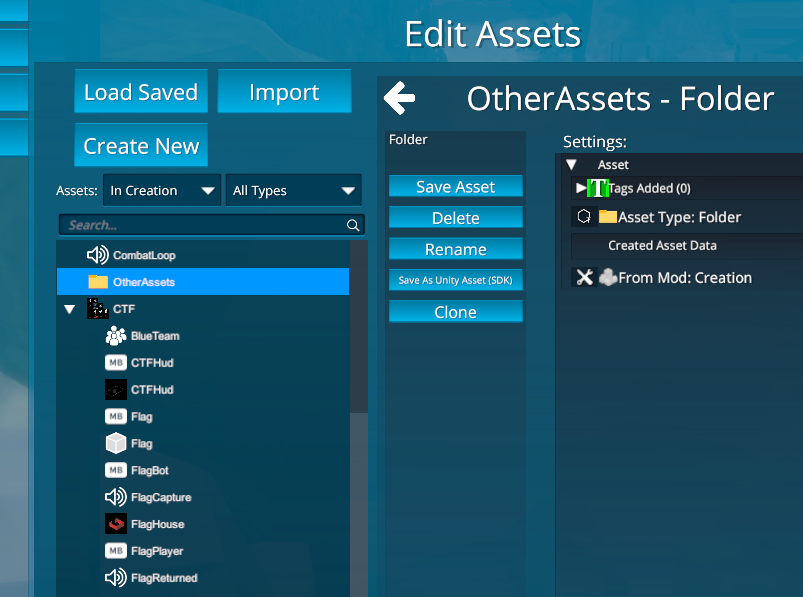
- 'Folders' in Assets screen. Can now organize assets into Folders - by creating a Folder, then dragging and dropping assets under it. Folders can also be uploaded to the Steam Workshop, for easier sharer of a group of assets
- Better Voxels: Better support for large voxel worlds and LOD transitions.

Example of using a folder:
New Featured Creations


https://steamcommunity.com/sharedfiles/filedetails/?id=2550184033&searchtext=
https://steamcommunity.com/sharedfiles/filedetails/?id=2523715728&searchtext=

Minor


- Fixed error that happened with climbing VR players when game was Restarted, resulting in their locomotion getting locked in place
- Fixed ammo going back into holder after being taken out first time
- Added 'No Toy Handle Highlight' and 'No Grab Outline' creation settings
- 'ProjectileSpawnedEntity' event to Gun component to get what entity it spawned in a projectile
- 'MoveHeadToPosition' method in PlayerAvatar/EntPlayerAvatarVR to move the avatar based on head position
- 'Open Online Doc Page' option in dropdown in edit window
- Fixed HumanoidnimationLoop not starting again on entity active
- Fixed 'Heal' with health system not adding right amount if lews than start health

Let us know any issues / thoughts on our Discord
thanks!

More from Modbox

Other announcements

All news
Game update27 Oct 2024Modbox no longer in developmentHey all, Wanted to finally update everyone on the status of Modbox. In 2022 Modbox was acquired from Alientrap by a large tech company. The Modbox dev team also moved to the company, and had a positive experience working on a new version of Modbox. But unfortunately development on Modbox paused in 2023, and some of the Modbox team returned to Alientrap to work on new projects. I apologize that…In-game event16 May 2022Modbox 2.3 - Fixes and new creationsHey all! We've released a update to fix a number of issues, and wanted to highlight some new creations. Changes: · Removed 'Desktop Editor Mode', which is now the default. We decided that 'Desktop Mode' was the better experience to get players into, so a prompt to switch to 'Desktop Editor' is longer shown to new players. Instead 'Gamepad Mode' or 'Desktop Mode' can be switch to while editing i…In-game event27 Feb 2022Modbox 2.205 - Saving Playmode WorldsHey all! We've added a large new feature for creations, and fixed a few known bugs. You can now save the 'play mode' of worlds and switch between them in creations. This allows for making creations made out of multiple worlds that players can switch between - while keeping the 'play mode state' of the world. This was something that's been requested for a while, so should be a great way to make…