Greetings! Here's the run-down on what's changed. And as always, if you have any questions/feedback or would like to see me demonstrate how to use any of these features, you can drop into my frequent live Twitch streams and talk to me personally: http://www.twitch.tv/AnarchyArcade
Multiple Embedded Tasks Speedups
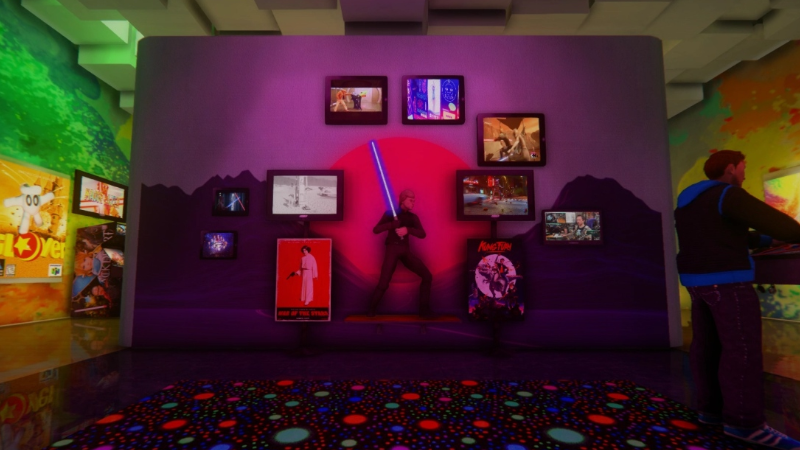
Today's update improves AArcade's ability to render numerous embedded tasks onto in-game screens at the same time. Why, you ask? Simple. Because people request it. So have fun multi-tasking on in-game screens! And (r)emember, just look at a screen and press the R button to set it on continuous play. You can hold TAB to manage/close your in-game tasks.
Slideshows (For Local Images)
Have a folder full of images? Just drag & drop one of the images to spawn it into your arcade. Then, middle-click on it and go to Advanced > Slideshow to transform it into a slide show of all the images in the folder! Note that slideshows only play when their object is active - and you can have as many slideshows active at the same time as you wish.
Drag & Drop Improvements
Now you'll be able to drag & drop images/URLs from standalone web browsers & even the games from the Steam client itself, in addition to local files.
3D Text Objects
Now, in addition to Landscape & Portrait, you'll also be able to choose 3D Text as a layout option. This will cause 3D letters to spawn on your object, allowing for some great signage. You'll want to use the new "Clear & Invisible" cabinet model on your 3D text objects - as they need no cabinet screen. (Newly created text cards will be 3D & use the appropriate cabinet by default.)
First Person Legs
Did you know most FPS games do not give you any legs in 1st person mode? Well as of today you can toggle on First Person Legs in AArcade, and the cool thing is that your legs will match what ever your player avatar model is!
Clone Your Instances
Too late for Halloween, but just in time for Christmas - the Instance Properties > Advanced tab now has a Clone button. Now you can clone your own arcades to preserve their original state before putting them through big remodels & renovations - such as we tend to do around holidays.
Favorites Lists Improvements
You may have already noticed that the List Properties menu has a Thumbnail field on it that didn't really get used anywhere. Today's update fixes that by adding Favorites Lists as one of the modes of the F6 Library tab. When you click the little heart on the bottom right corner of the F6 Library tab, all of your favorites lists will be shown to you as tiles to choose from.
In addition to the Favorites Lists mode, you'll also find new & improved Screenshots and Maps modes in the F6 Library tab.
Twitch Chat & New Cheer Command
The in-game Twitch chat support has been fixed & updated to the current Twitch API. You'll once again be able to use the chat menu (Y button) to talk to any Twitch streams you've setup in the Main Menu > Settings > Twitch tab.
Today's update also adds a new Twitch Bot Command. It's the !cheer TEXT_MSG command. If you have Twitch Bot Commands enabled & you are live streaming, your Twitch viewers can use this command to physically toss their TEXT_MSG out from your avatar's head into the AArcade world as 3D letters, followed by some junk objects that act as confetti.
You can customize which models are used as confetti by middle-clicking on a model and using the new Advanced > Flag/Unflag As Junk button. Anything you have flagged as junk will be among the pool of models used when tossing out confetti with the !cheer Twitch bot command.
Have fun! And you are all invited to join myself & the AArcade community in our Discord: https://discord.gg/9FSCDuJ
Or, if you prefer Twitter, I'm at Twitter.com/AnarchyArcade ːilyː ːspg2anarchyː
Change Log
- Added 3D Text objects. By default, newly created text items will be 3D text. Also added a clear & invisible cabinet that is used on 3D text objects - as they need no visual cabinet model.
- Added drag & drop support for standalone web browsers, the Steam app itself, and improved various other drag & drop support.
- Added First Person Legs Toggle to the Commands tab. It lets you turn on/off 1st person legs.
- Added Clone Instance to the Instance Properties > Advanced menu. Use it to make divergent copies of your own instances.
- Added Favorites mode to the F6 Library Browser. It lets you navigate playlists as tiles instead of the drop-down list.
- Added the ability to search screenshots to the F5 Library tab.
- Added !cheer to the Twitch Chat Bot commands. It will allow your Twitch viewers to type !cheer TEXT_MSG to have their text message get spewed out of your face in-game along with 3 or 4 random models that you've flagged as "Junk."
- Added Junk & Un-Junk buttons to the Object Properties menus. These buttons only show up if you have Twitch Bot Commands enabled. They let you add or remove models from the ones that get spewed out of your face when the new !cheer Twitch command is used.
- Added the console variable autoplay_enabled 1/0. It enables/disables the autoplay object system when loading maps - for debugging purposes.
- Fixed in-game Twitch chat support. If you haven't already - you can set it up in the Main Menu > Settings > Twitch tab.
- Fixed a bug that could have caused some arcades that had autoplay objects to crash upon loading their world.
- Fixed support for local images on the Edit Favorites List menu for the Thumbnail field.
- Fixed a bug that made filtering for type "nodes" to ignore search terms.
- Fixed a bug that would cause Reset Painted Material to only revert to the previously used texture instead of the original.
- Fixed a minor bug that caused selecting stuff using the Near By Objects menu to cause the game world to pause.
- Fixed an issue that made the F5 screenshot menu's cancel button look weird.
- Improved AArcade's multi-threaded optimization by forcing the console variable mat_queue_mode to 2 when starting in non-VR mode, and forcing it to 0 (as required) when starting in VR mode.
- Improved Camera Fly Mode on the Commands Tab to instead be Camera Fly Mode Toggle.
- Improved Maps mode on the F6 Library tab. It now only loads how ever many screenshot thumbnails that will fit in the screen.
- Improved map screenshot's default action in the F6 library to be to spawn them as objects into the world.
- Improved Live Twitch Channel detection to use the newest Twitch API. (So that the Twitch Chat menu can properly indicate which streams are live once again.)
NOTE
At 5:20PM Pacific I pushed a hotfix for this update to fix an issue with in-world screenshots not working as teleportals.