Hi everyone!
The first update for Brick Inventions is out (v1.0.3). The most important change is the addition of shortcuts for selecting blocks and rotations. Here is the full changelog with all the changes and bugfixes:
Improvements
- Added "Next level"-Button to go to the next level without having to go through the menu.
- Added "Reset"-Button to reset the current level on levels where the player can run out of resources
- Added shortcuts to make selection of blocks/rotations things faster (shortcuts can be edited in the options)
- Shortcut : Select/Change standard block material
- Shortcut : Select/Change standard block sizes
- Shortcut : Select/Change "additional" rotation (Standard, Side, Vertical)
- Shortcut : Select/Change special block
- Shortcut : Select/Change inventions
Changes:
- Set resources from 400 to 500 on level 4
Bugfixes:
- Fixed a bug that caused the sound of rockets to stop after some time.
- Fixed a bug that opened the chat window when pressing , preventing the function to switch between "drag" axis to be called
- Fixed flickering of the transparent block when the rotation is changed
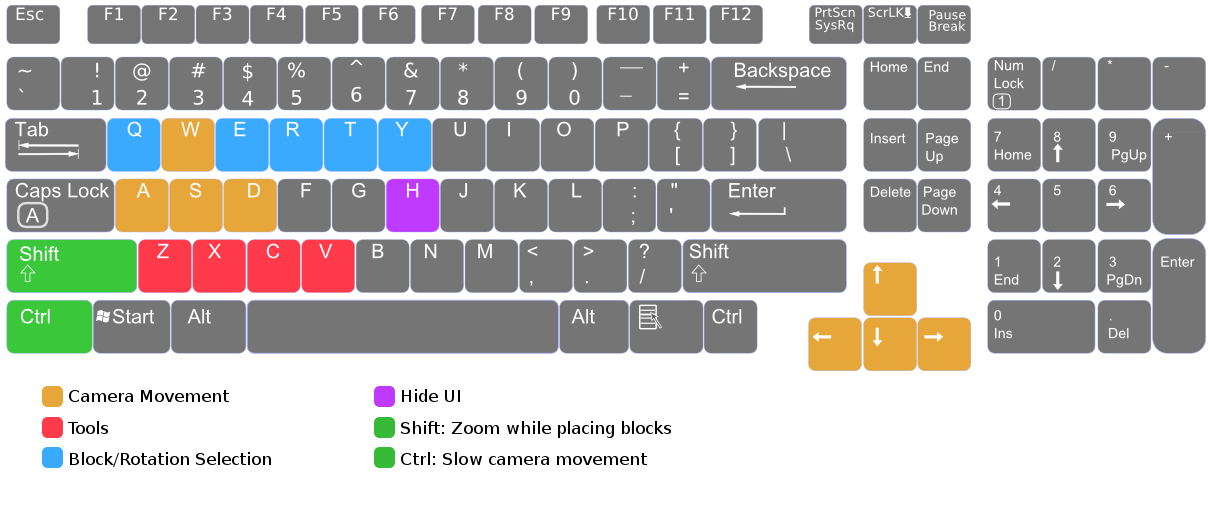
One of the next things I want to improve in one of the next couple of updates is the tutorial which should be a bit more detailed and should also explain the new shortcuts. If you have anything specific you want to be improved, just write a comment below an I will try to include it in the next patch.
More from Brick Inventions
Other announcements
Major Update 1.1The big 1.1 update is out and brings a lot of new features and improvements for the game. Besides many others, the main additions/changes are: · 10 New Singleplayer levels · New Special block: Bouncing Ball · Invention tool · First person camera (shortcut , only in Sandbox mode) · Slow motion function (shortcut ) · Redesigned menus & in-game UI Have a look at the changes in the new trailer: The…Update v1.0.5Hi guys! It took me a bit longer than expected to finish the patch as it contains many changes and fixes that were more complicated and initially caused some problems. Here's the full changelog: Improvements: · Changes in the tutorial to explain things in more detail. · Trigger now display connections which are over the maximum length as red lines. · Reduced network overhead in multiplayer sand…Update v1.0.4Just released a new version of Brick Inventions, containing several bugfixes and a new shortcut/feature. The most important changes are a fix for the multiplayer synchronization issue as well as a new option to deactivate the grid snapping. Changelog: Improvements: · Added shortcut to enable/disable grid snapping of blocks, allowing to place blocks more precisely. · Added restart button to leve…